Logitech’s Pebble line has quietly become the go-to for people who want a keyboard that is slim, quiet, portable, and genuinely nice to type on, without the bulk or noise of a mechanical board. The Pebble Keys 2 K380s and Pebble 2 combos pair minimalist looks with practical multi-device switching, making them ideal for tidy desks, small apartments, and anyone who moves between a tablet, laptop, and phone.
We spent time with the full Pebble family across colors and combo configurations to see whether the understated design translates into a keyboard worth living with. Here is our complete review.
As an Amazon Associate we earn from qualifying purchases at no extra cost to you.


🎮 Get More From Your Setup — Free
Prime Gaming gives you free PC games every month, in-game loot, and a free Twitch channel sub — plus fast free shipping on all the gear above. New members get a 30-day free trial.
Watch: Pebble Keyboard — Video Review
Design & Build
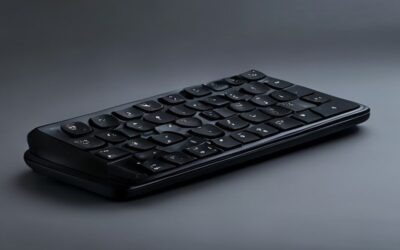
The Pebble aesthetic is all about clean, rounded minimalism. The Pebble Keys 2 K380s comes in Tonal White, Graphite, and Tonal Rose, letting you match your desk, and the low-profile keys with their circular caps look distinctive without being fussy. The Pebble 2 combos add a matching mouse in Black, Tonal Blue, and Tonal Graphite, including Mac-specific versions. Everything is lightweight and slim enough to slip into a bag, and while the construction is plastic, it feels solid and well-finished rather than cheap.
Performance
Typing on the Pebble is quiet and comfortable, with a soft, cushioned keystroke that suits libraries, shared offices, and late-night sessions. These are not mechanical keyboards, so they will not satisfy tactile switch enthusiasts, but for everyday email, documents, and browsing they are a pleasure. The standout feature is multi-device Bluetooth: you can pair the K380s with several devices and switch between your laptop, tablet, and phone with a single key. Battery life is excellent, running for months on standard cells, and the Mac combo versions add proper Mac layouts and shortcuts.
Pros & Cons
- Slim, quiet, and portable, ideal for shared spaces and travel.
- Multi-device switching between phone, tablet, and computer.
- Attractive color options to match any desk aesthetic.
- Long battery life on easily replaceable cells.
- Not mechanical, so it lacks the tactile feedback some typists crave.
- Compact layout omits a dedicated number pad.
Alternatives to Consider
If you want tactile mechanical feel, a compact mechanical board is the better fit, though it will be louder and heavier. For a full number pad, a larger wireless keyboard makes more sense. But for a quiet, stylish, ultra-portable typing experience that pairs with everything you own, the Pebble Keys 2 K380s is hard to beat, and the Pebble 2 combo adds a matching mouse for a complete tidy setup.
Related Guides
- Pebble Keyboard (2026)
- Best Budget Mechanical Keyboard For Gaming (2026)
- Best Budget Mechanical Keyboard For Gaming (2026)
- Wooting 60he Gaming Keyboard (2026)
- Keyboard With Mouse Built In (2026)
Frequently Asked Questions
Is the Pebble keyboard good for typing all day?
It is comfortable for everyday typing thanks to its quiet, cushioned keys, though heavy typists who prefer deep tactile feedback may miss a mechanical board over very long sessions.
Can it connect to multiple devices?
Yes. The Pebble Keys 2 K380s pairs with multiple devices over Bluetooth and switches between them with a dedicated key, making it excellent for multi-device workflows.
Does it work with Mac and iPad?
Absolutely. There are dedicated Mac combo versions, and the keyboards pair readily with iPads, iPhones, and Android devices in addition to Windows and Chrome machines.
How long does the battery last?
The Pebble keyboards are very efficient, running for many months on standard batteries before a swap is needed, which suits their grab-and-go design.
Verdict
The Logitech Pebble Keys 2 K380s is a delightful little keyboard for anyone who values quiet, portable, multi-device typing over mechanical feel. Pick the standalone K380s in your favorite color if you already have a mouse, or grab a Pebble 2 combo for a coordinated keyboard-and-mouse set that keeps your desk clean and calm.