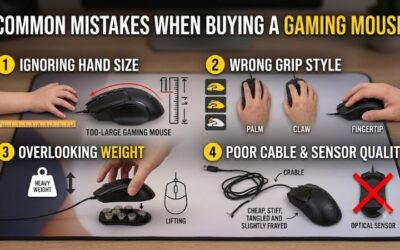
Palm grip rests your whole hand on the mouse, while claw grip lifts the middle of your palm away and arches your fingers like a paw, so the first favors comfort and stability and the second favors quick fingertip control. Most people drift into one of them without noticing, and the mouse shape you own may be quietly pushing you toward the wrong one. The sections below explain what each hold does, which shell geometry fits it, and how to change without losing a week of aim.
- Quick decision table
- The biomechanics in plain language
- Contact points you can check right now
- Shape pairing: hump, length and width
- A hand-size worked example
- Transition checklist: moving from palm to claw, or back
- Which games reward which grip
- When to stop and change your setup
- Related guides
- Frequently asked questions
The guidance comes from published ergonomics descriptions, manufacturer sizing notes and buyer reports compiled by the Editorial team. Nobody here has watched your hand, so treat each rule as a starting point you adjust by feel.

Hand Games 21: New Hand Games for Friends & Families
Included for 'Claw vs Palm Grip: Which Mouse Grip Suits Your Hand and Your Games?' as a relevant option in this category; details come from the product listing.
View on Amazon
Marshmallow Madness Board Game – Hilarious Family Board Games for Kids & Adults, Fun Fast-Paced Party Game for Family Night, Interactive Kids Board Games, Ages 8+
Included for 'Claw vs Palm Grip: Which Mouse Grip Suits Your Hand and Your Games?' because the listing specifies Hilarious Family Board Games for Kids & Adults and Fun Fast-Paced Party Game for Family Night, details this guide uses to compare options.
View on Amazon
Gamewright The Original Little Hands Playing Card Holder for Kids, Ages 3+ | Helps Little Hands Hold Cards on Their Own, For Kids Card Games, Go Fish & Old Maid, Holders for Playing Pieces
Included for 'Claw vs Palm Grip: Which Mouse Grip Suits Your Hand and Your Games?' because the listing specifies Ages 3+ and Helps Little Hands Hold Cards on Their Own, details this guide uses to compare options.
View on AmazonQuick decision table
| Question | Leans claw | Leans palm |
|---|---|---|
| Where does your palm touch? | Only the rear of the shell | Most of the shell, front to back |
| Where do fingers sit? | Arched, fingertips on buttons | Mostly flat along the buttons |
| Main motion for small aim | Fingers and wrist | Wrist and forearm |
| Typical complaint | Finger fatigue, cramping in the pad of the thumb | Slower fine corrections, heat on the palm |
| Typical sensitivity habit | Slightly higher | Slightly lower |
| Hand length vs mouse | Medium to short shell for the hand | Longer shell relative to the hand |
The biomechanics in plain language
With a palm grip, the heel of your hand and your finger pads share the load. The mouse is supported across a large surface, so muscles in the fingers stay relaxed. You move the cursor by pivoting at the wrist or sliding the forearm. This spreads effort over bigger muscles, which is why many long-session players like it.
With a claw grip, contact is reduced to the rear of the palm, the thumb and the ring and little fingers at the sides, plus the fingertips on the buttons. Your index and middle fingers act like springs, so clicking feels fast and the cursor can be nudged in tiny steps. The trade is that the finger and thumb muscles work harder to hold the shape, and cramping shows up faster if the mouse is the wrong size.
A third style, fingertip grip, sits further toward the front with almost no palm contact. It shares traits with claw but needs a lighter and usually smaller mouse. Some players slide between styles during a match, and that is normal. What matters is which hold you return to when you are not thinking about it.
Contact points you can check right now
Put your hand on your current mouse in your usual play position and look at it from the side. If a gap of roughly a finger width shows between the middle of your palm and the shell, you are claw or fingertip. If your palm is draped over the back with no gap, you are palm. Photos taken from the side help, because the feeling often differs from the reality.
- Check where the base of your thumb sits. In claw, it presses the left side near the back. In palm, it rests along the side lower down.
- Check your ring and little fingers. In palm, they often drag on the pad. In claw, they hold the right side from the edge.
- Check your wrist angle. A strongly bent wrist in either grip raises strain risk.
Shape pairing: hump, length and width
Grip and shell shape work as a pair. The hump is the highest point of the mouse, and where it sits changes what the palm can do. A rear hump gives the back of the palm something to press against, which suits claw. A hump nearer the middle spreads support under the palm, which suits palm grip.
| Shell trait | Better for claw | Better for palm | Why |
|---|---|---|---|
| Hump position | Toward the rear | Toward the middle | Claw needs a rear anchor; palm needs mid-body support |
| Length | Short to medium | Medium to long | Longer shells leave a gap under an arched hand |
| Width | Narrower | Wider | Narrow sides let fingers pinch; wide shells fill the palm |
| Side shape | Slight inward curve | Flared or flat sides | Controls where the thumb and ring finger rest |
| Weight | Lighter helps finger flicks | Heavier is tolerated | The whole hand supports the load in palm |
Symmetrical mice can work for either grip, but they do not guide your hand, so grip choice becomes more personal. Ergonomic right-hand shapes with a pronounced thumb rest often assume a palm hold. Always read the listing for length, width and hump position; if the numbers are missing, ask yourself why before buying.
A hand-size worked example
A widely repeated rule of thumb says a palm-grip mouse should be about sixty percent of your hand length, taken from the wrist crease to the tip of the middle finger. Claw and fingertip users often go a little shorter. It is a community guideline, not a standard, so use it to narrow the field rather than to rule things out.
Assume a hand length of 19 cm. Sixty percent gives about 11.4 cm for a palm-grip target. For claw, subtract a centimeter or so and aim for a shell near 10.5 to 11 cm. Next, measure the widest part of your palm; if it is 9 cm, a mouse with a width under 6 cm will leave the sides poking out of your hold, while a 6.5 cm body suits most grips.
| Step | Assumption or input | Result |
|---|---|---|
| Measure hand length | 19 cm (example) | Baseline number |
| Palm target at 60 percent | 19 x 0.6 | About 11.4 cm |
| Claw target, slightly shorter | 11.4 minus about 0.5 to 1 cm | About 10.5 to 11 cm |
| Compare with listing length | Number from the product page | Within about 1 cm is a reasonable fit |
| Check hump and weight | Rear hump for claw, mid hump for palm | Confirm from images and reviews |
Transition checklist: moving from palm to claw, or back
Switching grips changes which muscles do the work, so rush it and you will trade comfort for frustration. Use a gradual plan and keep your familiar setup nearby.
- Days 1 to 3: spend ten to fifteen minutes a day in an aim trainer or an offline map using only the new grip. Do not play ranked matches yet.
- Days 4 to 7: extend to thirty minutes. Keep the same sensitivity as before and note whether your flicks overshoot or undershoot.
- Days 8 to 10: change sensitivity in small steps, around five to ten percent at a time, until tracking feels steady.
- Days 11 to 14: mix in casual online matches. Return to your old grip for important games if accuracy dips.
- After two weeks, decide with evidence: compare comfort, accuracy and fatigue between the two grips.
Small hardware tweaks help too. Lift your arm slightly by adjusting chair height, relax your shoulder, and try grip tape or a different mousepad surface if your fingers slip. Resist the temptation to buy a new mouse in week one; most of the adjustment is your own habit.
Which games reward which grip
Game genre does not dictate grip, but it nudges preference. Tactical shooters that depend on tiny crosshair corrections at long range often attract claw and fingertip users. Titles with long sweeping turns, such as large-scale shooters or flight and driving sims, are friendly to palm grip because arm movement carries the cursor. Strategy and MOBA players who click hundreds of times a minute may prefer a hold that keeps the fingers light and ready.
If you split your time between several genres, choose the grip you can keep comfortable for the longest session. Fatigue ruins accuracy faster than any shape mismatch. Keep a short log of comfort after each session for a week and let the notes, not a forum opinion, settle the question.
When to stop and change your setup
Stop playing and rest if you feel numbness, tingling, a burning ache along the forearm or sharp pain at the base of the thumb. These are not signs of a grip you need to push through. Check the basics first: mouse size, desk height, wrist angle and whether your elbow rests at a relaxed right angle. If symptoms persist after adjusting your setup, speak with a qualified clinician. Nothing in this guide diagnoses or treats a medical condition.
Consider a different mouse if you cannot reach the side buttons without stretching, if your palm feels pinned against the shell, or if your hand keeps slipping into a grip you do not want. A shape that fits will not need constant conscious correction.
Related guides
- Usb C Kvm Switch For Two Laptops And Two Monitors
- Vertical Laptop Stand For Dual Laptop Desk Setup
- Nvme Enclosure With Active Cooling For Mac Mini
Frequently asked questions
Is claw grip better than palm grip for gaming?
Neither is better in general. Claw grip puts the fingertips over the buttons and tends to suit fast clicking and quick small corrections. Palm grip rests the whole hand on the shell and tends to feel steadier and more relaxed over long sessions. The better grip is the one that matches your hand size, your mouse shape and the way your favorite games ask you to aim.
Can I use a claw grip on a large mouse?
You can, but it is harder. Claw grip needs the back of your palm to touch the rear of the shell while your fingers arch forward, so a very long mouse leaves a gap that you must bridge by stretching. Many people with big hands manage fine on medium shapes. If your fingertips do not reach the buttons without lifting your palm, the shape is probably too long.
Does grip type affect sensitivity settings?
Not directly, but it affects how you move. Palm grip leans on the wrist and forearm, which many players pair with lower sensitivity and larger arm sweeps. Claw and fingertip holds allow quick finger and wrist flicks, so some players run slightly higher sensitivity. Treat any number as a starting point and adjust in small steps over several days.
How long does it take to switch grips?
Expect roughly one to three weeks before the new hold feels natural, with the first few days feeling clumsy. Short, regular practice sessions work better than a single long one. Keep your old setup available for ranked or competitive matches until your accuracy settles, and stop immediately if you notice pain or tingling.
Should I stop if my hand hurts?
Yes. Aching, numbness, tingling or sharp pain are signals to stop playing, rest and change your setup. Check mouse size, desk and chair height and wrist angle. If symptoms continue, see a qualified clinician. This guide covers general comfort and is not medical advice.