The best Android tablet deal for gaming and streaming right now is the TCL TAB A1 Plus, a 12.2-inch tablet with a 2.4K panel running at 120Hz — that pairing of resolution and refresh rate is the single most useful combination for someone who alternates between games, video and split-screen work. It suits a buyer who wants one device that feels current in 2026 rather than a compromise. If your ceiling is lower, the ECOPAD 10.1 is the best pure streaming buy in the budget tier, and if sharp text and long, glare-free reading sessions matter more than refresh rate, the TCL NXTPAPER 14 is the premium pick. Everything in this roundup is judged on six things and nothing else: display quality, chipset class, battery capacity, storage, software support and screen size. Below you get the three headline picks, a full comparison table, a decision matrix that maps your situation to a device, and the arithmetic behind why a 120Hz 2.4K screen and a 6000mAh battery behave the way they do.
- Top 3 Picks
- Quick Comparison
- How We Chose
- 1. URAO 10.1″ Android 16 Tablet – Best for Large Storage on a Mid-Range Budget
- 2. ECOPAD 10.1″ Android 15 Tablet – Best Budget Pick for Streaming
- 3. HOTTABLET 7″ Android 14 Tablet – Best for Kids, Travel and Bedside Use
- 4. TCL TAB 10 Gen 4 – Best for Work, Documents and Video Calls
- 5. TUOHAITIME 10″ Android 16 Tablet – Best for Casual Gaming and Everyday Media
- 6. TCL TAB A1 Plus – Best Overall for Gaming and Streaming
- 7. TCL NXTPAPER 14 – Best for Reading and Long Viewing Sessions
- 8. Jeazans 10.1″ Android 16 Tablet – Best for Storage-Heavy Media Libraries
- 9. Lenovo Idea Tab – Best Premium Pick for College Work and Cloud Gaming
Top 3 Picks
Best overall: TCL TAB A1 Plus
A 12.2-inch 2.4K display at 120Hz is the specification that actually changes how a tablet feels day to day, because it gives both a sharp image for streaming and a short enough frame window for smooth motion in games. With 6GB of RAM and 128GB of storage it has enough headroom for a handful of large titles plus a downloaded video library. It is the pick for anyone who wants one premium tablet for gaming, streaming and light productivity.
Best budget: ECOPAD 10.1
The ECOPAD pairs a 1280×800 IPS panel with Android 15, 12GB of combined memory (4GB physical plus 8GB extended) and 64GB of storage that expands to 1TB over microSD. The resolution is modest, but for 1080p streaming, cloud gaming and casual titles it covers the essentials at the lowest tier. The microSD slot is what makes it a genuinely usable budget media device rather than a disposable one.
Best premium: Lenovo Idea Tab
An 11-inch 2.5K IPS touchscreen at 90Hz driven by a MediaTek Dimensity 6300 and 8GB of memory is the most capable platform in this list for cloud gaming and browser-heavy coursework. The Dimensity 6300’s CPU and GPU class puts it a clear step above the generic octa-core chipsets in the value tablets. It is the pick if you want the tablet to still feel responsive two or three years from now.
Quick Comparison
The table below covers every tablet in this roundup. Price tiers are relative bands rather than fixed figures, because listing prices move daily and the same device can sit in two bands depending on configuration and season. “Combined RAM” means the headline number in the listing, which on many Android tablets includes virtual memory expansion on top of physical RAM.
| Product | Best for | Key specs | Price tier |
|---|---|---|---|
| URAO 10.1″ Android 16 Tablet | Large storage on a mid-range budget | 10.1″ display; Android 16; octa-core; 36GB combined RAM; 128GB storage; dual camera | Mid-range |
| ECOPAD 10.1″ Android 15 Tablet | Cheapest good streaming tablet | 10.1″ 1280×800 IPS; Android 15; 12GB (4+8) RAM; 64GB ROM; 1TB microSD expansion | Budget |
| HOTTABLET 7″ Android 14 Tablet | Kids, travel and bedside use | 7″ IPS; Android 14; 8GB (3+5) RAM; 32GB ROM; dual camera; protective case included | Budget |
| TCL TAB 10 Gen 4 | Work, documents and video calls | 10.1″ FHD display; 4GB RAM; 128GB storage | Premium |
| TUOHAITIME 10″ Android 16 Tablet | Casual gaming and everyday media | 10″ display; Android 16; octa-core CPU; black finish | Mid-range |
| TCL TAB A1 Plus | Overall gaming and streaming | 12.2″ 2.4K display at 120Hz; 6GB RAM; 128GB storage | Premium |
| TCL NXTPAPER 14 | Reading and long viewing sessions | 14.3″ 2.4K paper-like matte display; 8GB RAM; 256GB storage | Premium |
| Jeazans 10.1″ Android 16 Tablet | Storage-heavy media libraries | 10.1″ display; Android 16; 24GB RAM; 64GB ROM; 1TB expansion | Mid-range |
| Lenovo Idea Tab | College work and cloud gaming | 11″ 2.5K IPS touchscreen at 90Hz; MediaTek Dimensity 6300; 8GB memory | Premium |
| CUPEISI 10″ Android 16 Tablet | Cheap tablet with 128GB onboard | 10″ 1280×800 HD; Android 16; 20GB RAM; 128GB ROM; 2TB expansion; 2.0GHz octa-core | Budget |
| Lenovo Tab One | One-handed streaming | 8.7″ HD display; 4GB memory; up to 12.5 hours of YouTube streaming | Mid-range |
| COOPERS 10″ Android 15 Tablet | Battery life on a tight budget | 10″ display; Android 15; quad-core; 32GB ROM; 1TB expansion; 6000mAh battery | Budget |
How We Chose
These twelve tablets were selected from currently listed Android devices by comparing published specifications and specification classes, not by handling the hardware. The first filter was category fit: every device had to be an Android tablet with a stated display size, a stated memory and storage configuration, and a stated Android version, so that a buyer could compare them on equal terms.
The second filter was use case. A 7-inch tablet with 32GB of storage serves a child or a frequent flyer; a 14.3-inch tablet serves someone reading PDFs for hours. Judging them on the same scorecard would be dishonest, so each one is framed against the job it is actually suited to. The third filter was upgrade path: we weighted the Android version on the listing, the presence of a microSD slot, the physical RAM figure where the listing separates it from extended memory, and the display resolution and refresh rate, because those are the specifications that determine whether a device still feels usable in 2028. Generic “octa-core” and “quad-core” chipsets were treated as a spec class rather than a performance claim, since no reputable source can rank unnamed silicon. Where a listing gave a specific, checkable figure — a resolution, a refresh rate, a named SoC, a battery capacity — we used it directly and said so.
1. URAO 10.1″ Android 16 Tablet – Best for Large Storage on a Mid-Range Budget
The URAO is aimed at the buyer who wants a current-generation Android version and a generous storage figure without paying premium money. Its listing headlines a 10.1-inch screen, Android 16, an octa-core processor, a 36GB+128GB memory and storage combination, and dual cameras. That package suits a household’s second tablet: something for streaming, video calls and lighter games that does not need to be the fastest thing in the house.
- Display: 10.1-inch class panel — the listing does not state resolution, so treat it as a standard-density panel rather than a high-density one
- Operating system: Android 16
- Processor: octa-core (SoC not named in the listing; expect entry-to-mid tier ARM silicon)
- Memory and storage: 36GB combined RAM figure plus 128GB of storage
- Cameras: dual camera arrangement for calls and snapshots
- Price tier: mid-range
The single most useful thing to understand about the “36GB” figure is that on tablets in this class it is a combined number. Android’s virtual memory expansion takes a slice of internal storage and presents it to the system as extra RAM. If physical RAM is, say, 8GB, the remaining 28GB is swap space carved out of flash. That swap is genuinely useful — it stops background apps from being killed when you have a browser, a video app and a game open — but it is far slower than physical memory, so it improves multitasking headroom rather than frame rates. When you compare this tablet with the Jeazans 10.1, which advertises 24GB, or the CUPEISI, which advertises 20GB, you are mostly comparing the size of the virtual memory pool, not raw computing power.
Where the URAO does stand out is the 128GB of onboard storage, which is double what the ECOPAD and Jeazans offer at 64GB. For a media tablet that difference is practical rather than cosmetic: modern Android games routinely occupy 3GB to 8GB once assets are unpacked, and a downloaded video library eats space quickly. Android 16 is also the newest software version in this roundup alongside the TUOHAITIME and CUPEISI listings, which matters for how long the device stays current with app requirements.
Pros
- 128GB of internal storage is generous for the mid-range tier
- Android 16 as listed, the newest Android version represented here
- Dual cameras make it a reasonable video-call device
- 10.1-inch size is the sweet spot for two-handed gaming and streaming
Cons
- Resolution is not stated, which usually signals a standard-density panel
- No named chipset, so sustained gaming performance is unpredictable
- The 36GB memory headline is mostly virtual memory, not physical RAM
- No mention of a microSD slot, so 128GB may be the hard ceiling
Against the nearest alternative, the CUPEISI, the URAO trades a lower headline RAM figure for a bigger Android version and 128GB of storage in the same class — but the CUPEISI explicitly lists a 1280×800 resolution and 2TB of expansion, which is more information to make a decision with. If you want the most transparent spec sheet at this tier, the CUPEISI wins; if you want the newest Android version, the URAO does.
2. ECOPAD 10.1″ Android 15 Tablet – Best Budget Pick for Streaming

ECOPAD 10.1 Inch Tablet, Android 15 Tablets 12GB(4+8) RAM / 64GB ROM / 1TB SD Card Expansion, 1280x800 IPS HD Touchscreen, 6000mAh Battery, Bluetooth 5.0, Dual Cameras, GMS, Dual Band WiFi, Black
Included for 'Best Android Tablet Deals for Gaming and Streaming' because the listing specifies 1280x800 IPS HD Touchscreen and 6000mAh Battery, details this guide uses to compare options.
View on AmazonThe ECOPAD is the tablet to buy when the budget is genuinely tight and the job is video. Its listing gives a 10.1-inch 1280×800 IPS HD panel, Android 15, 12GB of memory shown as 4GB plus 8GB expanded, 64GB of storage and support for a 1TB microSD card. That is a coherent package for streaming, browsing and cloud gaming, and the explicit 4+8 split is more honest than most listings at this tier.
- Display: 10.1-inch IPS, 1280×800 HD
- Operating system: Android 15
- Memory: 12GB total shown as 4GB physical plus 8GB extended
- Storage: 64GB internal, expandable to 1TB via microSD
- Price tier: budget
To understand what 1280×800 means in practice, do the pixel arithmetic. That panel contains 1,024,000 pixels. A 1920×1200 panel contains 2,304,000, and a 2400×1600 panel contains 3,840,000. The ECOPAD therefore has roughly 44% of the pixels of a full-HD-class 10-inch tablet and about 27% of a 2.4K one. For 1080p video playback that means the content is downscaled to fit, which costs you fine detail in dark scenes and small on-screen text, but it also means the GPU has far less work to do per frame — which is exactly why budget tablets with low-density panels can still feel smooth in simple games.
The 4GB physical RAM is the real constraint here. Android 15 itself and the system UI occupy a meaningful slice of that, so expect to keep two or three apps comfortably alive and to see background apps reload when you switch. The 8GB of extended memory softens that considerably, and it is the difference between a tablet that can hold a browser and a video app simultaneously and one that cannot. For streaming and cloud gaming, where the heavy lifting happens on a server, 4GB is workable. For locally installed 3D games, it is the ceiling you will notice first.
Pros
- 1TB microSD support removes the storage ceiling entirely
- Listing separates physical from extended RAM, which is rare and useful
- 10.1-inch 16:10-ish panel is well suited to widescreen video
- Lowest price tier of any 10-inch tablet in this roundup
Cons
- 1280×800 resolution is soft for text and small interface elements
- 4GB of physical RAM limits heavy multitasking
- Android 15 is one version behind the Android 16 listings here
- 64GB of internal storage fills quickly before you add a card
The closest alternative is the CUPEISI, which sits in the same budget tier but doubles internal storage to 128GB and lists a 2TB expansion ceiling. If you plan to install games rather than stream them, the CUPEISI’s extra onboard storage is worth more than the ECOPAD’s marginally newer-looking memory configuration. If you plan to stream everything and keep files on a card, the ECOPAD is the cleaner budget choice.
3. HOTTABLET 7″ Android 14 Tablet – Best for Kids, Travel and Bedside Use

HOTTABLET Tablet 7Inch Android 14.0 with Protective Case, 8GB(3+5GB Expand) RAM+ 32GB ROM, IPS Screen, Dual Camera, Bluetooth 5.0 WiFi Tab (Navy)
Included for 'Best Android Tablet Deals for Gaming and Streaming' because the listing specifies 8GB(3+5GB Expand) RAM+ 32GB ROM and IPS Screen, details this guide uses to compare options.
View on AmazonThe HOTTABLET is a small-format Android 14 tablet with a 7-inch IPS screen, 8GB of memory shown as 3GB plus 5GB expanded, 32GB of storage, a dual camera setup and a protective case included in the box. Its reason to exist is size and ruggedness: a 7-inch slab is light enough to hold one-handed for an hour, fits a jacket pocket, and is far less painful to replace than a 12-inch tablet if it gets dropped.
- Display: 7-inch IPS
- Operating system: Android 14
- Memory: 8GB total shown as 3GB physical plus 5GB extended
- Storage: 32GB internal
- Extras: protective case included; dual camera
- Price tier: budget
Screen size changes the arithmetic of a tablet more than any other single specification, and 7 inches is the clearest example. A 7-inch 16:10 panel has roughly 135 square centimetres of viewable area, against roughly 280 square centimetres for a 10.1-inch panel and about 560 for a 14.3-inch one. That is not a small difference: the 14.3-inch NXTPAPER gives you more than four times the viewing area of this device. The trade is portability and weight, and for a child or a commuter the trade usually goes the right way.
3GB of physical RAM is the tightest configuration in this roundup, and it defines the device’s realistic envelope. Android 14 with a launcher, a streaming app and a browser is comfortable; adding a 3D game on top will push the system into aggressive background management. The 5GB of extended memory helps, but swap performance on a small internal storage partition is not fast. The 32GB of internal storage is the other hard limit — with the system taking a large share of it, you are looking at roughly 20GB of usable space, which is enough for a handful of apps and a modest offline video cache.
Pros
- Protective case included, which removes an immediate extra purchase
- 7-inch format is genuinely one-handed and pocketable
- Light enough to hold above your face in bed without arm fatigue
- Lowest absolute cost of entry in this roundup
Cons
- 3GB of physical RAM is the smallest here and limits heavy gaming
- 32GB of storage is restrictive once the system partition is accounted for
- Android 14 is the oldest software version in this roundup
- No stated microSD support in the listing, so storage may be fixed
Compared with the Lenovo Tab One, the only other small tablet here, the HOTTABLET is cheaper and comes with a case, but the Lenovo lists an 8.7-inch HD display, 4GB of memory and up to 12.5 hours of YouTube streaming — a larger screen and a much more concrete battery claim. For a young child, the HOTTABLET’s size and bundled case make more sense. For an adult who wants a small tablet that lasts through a long flight, the Lenovo Tab One is the better-supported device.
4. TCL TAB 10 Gen 4 – Best for Work, Documents and Video Calls
The TCL TAB 10 Gen 4 is a 10.1-inch tablet with an FHD display, 4GB of RAM and 128GB of storage. TCL is a display manufacturer first, and that heritage shows in the panel choice: this is the cheapest way in this roundup to get a full-HD-class 10-inch screen, which is the threshold at which small text in documents stops looking fuzzy. It suits a student or home-office user who needs a light second screen for PDFs, email and video calls.
- Display: 10.1-inch FHD (full-HD class, typically 1920×1200 on a 10.1-inch 16:10 panel)
- Memory: 4GB RAM
- Storage: 128GB internal
- Price tier: premium (positioned above the budget 10-inch class)
Resolution is the specification that decides whether a tablet is pleasant for reading, and the arithmetic is unforgiving. A 10.1-inch 1280×800 panel works out at roughly 149 pixels per inch. A 1920×1200 panel of the same size works out at roughly 224 pixels per inch. The second number is above the point where most people stop noticing pixel structure at normal reading distance, which is why FHD-class panels are the practical floor for document work, textbook reading and long-form browsing. If you spend more time reading than watching video, this is the most important line in the specification sheet.
The 4GB of RAM is the compromise. It is the same physical figure as the ECOPAD at a much lower price tier, and it means the TAB 10 Gen 4 is a device for one or two foreground apps rather than a dozen browser tabs. The 128GB of storage, on the other hand, is genuinely useful — it is the same capacity as the far more expensive TCL TAB A1 Plus, and it means you can keep a substantial offline library without thinking about it.
Pros
- FHD-class display is a clear step up for text and reading
- 128GB of storage matches tablets costing considerably more
- TCL’s display manufacturing background is a reasonable quality signal for the panel
- 10.1-inch size balances portability and usable screen area
Cons
- 4GB of RAM is modest for the premium tier
- No stated high refresh rate, so motion will be standard 60Hz
- No named chipset in the listing
- Premium tier pricing for mid-tier memory
The nearest alternative is the Lenovo Idea Tab, which costs more but gives you an 11-inch 2.5K 90Hz display, a named MediaTek Dimensity 6300 and 8GB of memory. If your budget allows the step up, the Idea Tab is the better long-term device on every axis except price. The TAB 10 Gen 4 wins on one thing: it is the least expensive route to a full-HD 10-inch panel with 128GB of storage.
5. TUOHAITIME 10″ Android 16 Tablet – Best for Casual Gaming and Everyday Media
The TUOHAITIME is a 10-inch Android 16 tablet with an octa-core CPU and a black finish. It sits in the middle of the market: newer software than most of the budget tier, a screen size that works for both games and video, and no premium-tier pricing. It suits a buyer who wants a current Android version and a mainstream size without paying for a high-density panel or a named flagship chipset.
- Display: 10-inch class
- Operating system: Android 16
- Processor: octa-core CPU (SoC not named)
- Colour: black
- Price tier: mid-range
When a listing says “octa-core” without naming the chip, the useful way to read it is as a class rather than a promise. Almost every modern ARM tablet SoC has eight cores, usually split between a small number of high-performance cores and a larger number of efficiency cores. What varies enormously is the core design and the GPU attached to it. A generic octa-core tablet will handle 2D and light 3D games, emulation of older consoles and streaming without difficulty, but it will not sustain high frame rates in demanding 3D titles the way a named mid-range chipset does. The honest expectation is smooth performance in casual games and variable performance in graphically heavy ones, with the exact figures depending on resolution, settings and the game’s patch level.
Android 16 is the TUOHAITIME’s strongest card. A newer Android version affects two things that matter over a multi-year ownership: the ability to install apps that target recent API levels, and the cadence of security updates. Android 16 is the newest version in this roundup alongside the URAO and CUPEISI listings, so on software longevity alone it sits ahead of the ECOPAD at Android 15, the COOPERS at Android 15 and the HOTTABLET at Android 14.
Pros
- Android 16 as listed, tying the newest software version here
- 10-inch size suits both gaming and widescreen streaming
- Mid-range tier rather than premium pricing
- Neutral black finish that does not draw attention
Cons
- No named chipset, so gaming performance cannot be predicted
- Resolution, refresh rate and battery capacity are all unstated
- Memory and storage figures are not given in the listing
- Less information to compare against than almost any other tablet here
The direct comparison is with the URAO, which also lists Android 16 and an octa-core processor but adds explicit 36GB and 128GB figures. On the information available, the URAO is the safer buy because you know what you are getting on the storage side. The TUOHAITIME only becomes the better choice if you find it at a lower price for a similar configuration, in which case the software version is the thing you are really buying.
6. TCL TAB A1 Plus – Best Overall for Gaming and Streaming

TCL TAB A1 Plus Android Tablet, 12.2" 2.4K 120Hz Display, 6+128GB
Included for 'Best Android Tablet Deals for Gaming and Streaming' because the listing specifies 12.2" 2.4K 120Hz Display and 6+128GB, details this guide uses to compare options.
View on AmazonThe TCL TAB A1 Plus is the best overall Android tablet deal in this roundup for someone who wants one device for both gaming and streaming. It pairs a 12.2-inch 2.4K display with a 120Hz refresh rate, 6GB of RAM and 128GB of storage. That combination is rare: most large tablets give you resolution or refresh rate, not both, and the tablets that give you both usually cost considerably more.
- Display: 12.2-inch 2.4K (roughly 2400×1600 class) at 120Hz
- Memory: 6GB RAM
- Storage: 128GB internal
- Price tier: premium
Here is the arithmetic that explains why the 120Hz panel matters more than the resolution number. A 2400×1600 panel contains 3,840,000 pixels. Refresh it 120 times a second and you are pushing 460.8 million pixels per second through the display pipeline before blanking overhead; add the roughly 5% to 10% of pixels consumed by the horizontal and vertical blanking intervals and the real figure is closer to 500 million pixels per second. At 24 bits per pixel, that is about 12 gigabits per second of internal display bandwidth. Drop to 60Hz and the same panel needs half that. Drop to a 1280×800 panel at 60Hz and you need about 64 million pixels per second — roughly one eighth of the load. The refresh rate and resolution together determine how hard the display controller and GPU have to work, which is why a 120Hz 2.4K screen is a meaningful hardware statement rather than a marketing line.
The second piece of arithmetic is the frame budget. At 60Hz the GPU has 16.7 milliseconds to produce each frame. At 90Hz it has 11.1 milliseconds. At 120Hz it has 8.3 milliseconds. That budget includes rendering, compositing and handing the frame to the display. If a game averages 14 milliseconds per frame, it cannot hit 120Hz no matter what the panel supports — but it can hit 60Hz reliably, and locking it to 60 will feel smoother than letting it oscillate. That is the practical rule for a tablet like this: set demanding games to a 60fps cap, and let lighter titles and the system UI run at 120Hz.
The 6GB of RAM and 128GB of storage are the sensible middle of the premium tier. Six gigabytes is enough to keep a game, a chat app and a browser alive at once, and 128GB matches the TCL TAB 10 Gen 4 at a much lower position in the range. For streaming, the 12.2-inch 2.4K panel is large enough that two people can watch comfortably, and high enough in density that subtitles stay crisp.
Pros
- 120Hz refresh rate on a 2.4K panel — the best display combination in this roundup
- 12.2-inch size works for gaming, split-screen and shared viewing
- 6GB of RAM is a genuine step above the 4GB tier
- 128GB of storage matches more expensive alternatives
Cons
- Premium tier pricing
- No named chipset in the listing, so sustained performance is uncertain
- Battery capacity is not stated, and a 120Hz 2.4K panel draws more power
- Larger and heavier than a 10-inch tablet for one-handed use
The nearest alternative is the Lenovo Idea Tab, which offers an 11-inch 2.5K 90Hz display, a named Dimensity 6300 and 8GB of memory. If you want a chipset you can research in advance, the Idea Tab is the safer pick. If you want the largest, sharpest, fastest panel in this list, the TAB A1 Plus is the pick, and its 120Hz refresh rate is a full step beyond the Idea Tab’s 90Hz.
7. TCL NXTPAPER 14 – Best for Reading and Long Viewing Sessions
The TCL NXTPAPER 14 is the specialist in this group. It has a 14.3-inch 2.4K display with TCL’s NXTPAPER paper-like finish, 8GB of RAM and 256GB of storage. NXTPAPER panels are matte and anti-reflective rather than glossy, which changes the viewing experience in a way no resolution figure captures: instead of a mirror that reflects every lamp in the room, you get a surface closer to printed paper. It suits someone who reads for hours, annotates documents, or streams in a bright room where a glossy panel would be unusable.
- Display: 14.3-inch 2.4K with NXTPAPER paper-like matte finish
- Memory: 8GB RAM
- Storage: 256GB internal
- Price tier: premium
The size deserves a worked comparison, because 14.3 inches is not simply “bigger”. A 14.3-inch 16:10 panel has roughly 560 square centimetres of viewable area. A 10.1-inch panel has roughly 280. The NXTPAPER therefore gives you twice the usable area of a mainstream 10-inch tablet and more than four times that of a 7-inch one. In practice that means a full A4 PDF page at close to 100% zoom, a two-column document layout that is actually readable, and a split-screen view where both halves are the size of a small tablet. It also means the device needs two hands and a lap or a stand.
8GB of RAM and 256GB of storage are the largest configuration in this roundup. The storage figure matters more than it looks: with 256GB, a downloaded video library and a set of large apps coexist without the constant housekeeping that a 32GB or 64GB device demands. Using the standard bitrate figures — roughly 2.25GB per hour for 1080p, 3.6GB per hour for 1080p60, 6.75GB per hour for 4K, and about 11.25GB per hour for 4K HDR — 200GB of usable space holds about 88 hours of 1080p or roughly 17 hours of 4K HDR. On a 32GB tablet with about 20GB usable, the same maths gives you under 9 hours of 1080p.
Pros
- Matte, anti-reflective NXTPAPER surface is far easier on the eyes in bright rooms
- 8GB of RAM is the largest memory configuration in this roundup
- 256GB of storage is double everything else here
- 14.3-inch 2.4K panel is genuinely usable for full-page documents
Cons
- Largest and heaviest device in this roundup; not a handheld gaming tablet
- Premium tier pricing with the highest storage tier
- No stated refresh rate, so assume standard 60Hz motion
- Matte finishes slightly soften the perceived contrast of dark video content
Against the TCL TAB A1 Plus, the choice comes down to what you do more of. The A1 Plus has the 120Hz panel and the more portable 12.2-inch body, which makes it the better gaming device. The NXTPAPER 14 has the larger, matte, higher-storage configuration, which makes it the better reading and long-session streaming device. If you split your time evenly, the A1 Plus is the more flexible of the two.
8. Jeazans 10.1″ Android 16 Tablet – Best for Storage-Heavy Media Libraries
The Jeazans is a 10.1-inch Android 16 tablet with a 24GB memory figure, 64GB of storage and support for expansion up to 1TB. It is aimed at the buyer who wants the newest Android version and a large memory headline, and who is willing to supply their own storage card. It suits a media hoarder: someone who keeps a card full of films and series rather than streaming everything.
- Display: 10.1-inch class
- Operating system: Android 16
- Memory: 24GB combined figure (physical plus extended, split not stated)
- Storage: 64GB internal, expandable to 1TB
- Price tier: mid-range
The memory arithmetic here is worth spelling out, because the listing gives the combined total without the split. If the physical RAM is 8GB, the remaining 16GB is virtual memory carved out of internal storage. If the physical RAM is 6GB, the extended pool is 18GB. Both are plausible, and the listing does not tell you which. What you can say with confidence is that a 24GB combined figure in this class means the majority of the number is swap. The practical consequence is that multitasking headroom will be good — the system can keep many apps resident without killing them — but that opening a heavy game will still feel limited by physical memory and the GPU, not by the swap pool.
The 64GB of internal storage is the weak point relative to the URAO and CUPEISI, both of which list 128GB at the same or a lower tier. The 1TB expansion support offsets that if you are willing to buy a card, and for a media library a microSD card is the cheapest storage you will ever add to a tablet. The trade-off is that apps installed to a card are slower to load and some games refuse external installation entirely, so 64GB of internal space will still be doing the heavy lifting for anything you play.
Pros
- Android 16 as listed, matching the newest version here
- 1TB microSD expansion removes the storage ceiling
- Large combined memory figure supports heavy app switching
- 10.1-inch size is the mainstream choice for media
Cons
- 64GB of internal storage is half what rivals offer at this tier
- The 24GB memory headline does not state the physical/extended split
- Resolution, refresh rate and battery capacity are unstated
- Expansion requires buying a card, which changes the real cost
The comparison with the URAO is the interesting one: both list Android 16 and a large combined memory figure, but the URAO lists 128GB of internal storage and the Jeazans lists 64GB with 1TB expansion. If you will never use a card, the URAO is straightforwardly better. If you already own a large microSD card, the Jeazans gives you the same software version with a path to far more total storage.
9. Lenovo Idea Tab – Best Premium Pick for College Work and Cloud Gaming
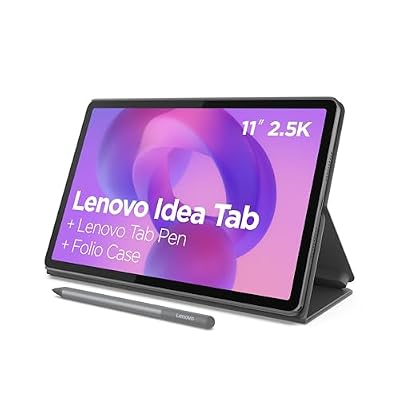
Lenovo Idea Tab - College Tablet - 11″ 2.5K IPS Touchscreen Display - 90Hz - MediaTek Dimensity 6300-8 GB Memory - 256 GB Storage - Integrated Arm Mali-G57 MC2 - Tab Pen and Folio Case
Included for 'Best Android Tablet Deals for Gaming and Streaming' because the listing specifies College Tablet and 11″ 2.5K IPS Touchscreen Display, details this guide uses to compare options.
View on AmazonThe Lenovo Idea Tab is an 11-inch tablet with a 2.5K IPS touchscreen at 90Hz, a MediaTek Dimensity 6300 processor and 8GB of memory. It is the only device in this roundup that names its chipset, and that alone makes it the easiest premium tablet to evaluate. It suits a student or a hybrid worker who wants a tablet that can run a browser with many tabs, take handwritten notes, and handle cloud gaming sessions without stuttering.
- Display: 11-inch 2.5K IPS touchscreen at 90Hz
- Processor: MediaTek Dimensity 6300
- Memory: 8GB
- Price tier: premium
The Dimensity 6300 is a 6-nanometre octa-core part built from two high-performance cores and six efficiency cores, paired with a modest Mali-class GPU. That architecture is the reason it performs the way it does: the two large cores carry single-threaded work like app launches and browser rendering, while the six smaller cores handle background tasks efficiently, which is why battery life on this class of chipset is usually good. It is not a flagship gaming chip and it will not drive the most demanding 3D titles at high frame rates, but it is comfortably the most predictable platform here. Published performance figures for this chip class put demanding 3D titles in the modest range at native resolution, with