Long hours at a PC leave forearms resting against a hard desk edge, and that constant contact adds up. The edge presses into soft tissue, shoulders stay lifted to hold the arms in place, and by late afternoon the ache spreads from wrist to neck. A desk armrest breaks that pattern by giving the forearm a padded surface level with the desktop.
- Quick Answer
- VIVO Universal Clamp-on Adjustable Armrest MOUNT-ARM01
- BONTEC Ergonomic Arm Rest Support EH01
- HONJIE Computer Arm Support Bracket STB-B1
- BONTEC Ergonomic Desk Extender Tray EH03-US
- VIVO Clamp-on Foldable Desk Extender DESK-EXT24W
- How to choose
- Who should skip it
- Frequently Asked Questions
- Final verdict
- Product and ASIN Reference


This guide covers clamp-on and desk-mounted armrests only, the kind that attach to the desk edge and extend the work surface forward. Every pick below has a confirmed Amazon listing code, and the guide explains clamp fit, adjustment range, and padding so you can match the support to your desk.
As an Amazon Associate, we earn from qualifying purchases.
Quick Answer
The VIVO MOUNT-ARM01 is the most versatile pick for most PC desks, with a rotating clamp-on arm and adjustable height. The BONTEC EH01 suits mouse-heavy work with a 13-inch reach and height adjustment from 2.4 to 5.3 inches. Budget buyers should look at the HONJIE steel bracket or the foldable BONTEC tray, while the wide VIVO 24-inch extender fits keyboard and mouse together.
VIVO Universal Clamp-on Adjustable Armrest MOUNT-ARM01
The VIVO MOUNT-ARM01 is the classic clamp-on armrest, and it remains the most flexible option for a single forearm. A steel clamp grips the desk edge, and the padded platform rotates a full 360 degrees on its base, so the support follows the arm as it moves between keyboard and mouse. A 90-degree swivel on the pad lets the cushion angle toward the hand without moving the whole arm.
Height adjustment is the detail to check before ordering. The maker lists a height range from 1.4 to 3.9 inches above the desk surface, while some listings describe the adjustment as 2.5 inches of travel. The clamp fits desks up to 2.2 inches thick, which covers most standard desktops but not the thickest butcher-block tops.
The pad is a rectangular steel platform with a polyurethane cushion, sized for one forearm and elbow. It works best on the mouse side, where the arm stays in one place for long stretches.
Specs
- Model: MOUNT-ARM01
- Mount: clamp-on, fits desks up to 2.2 inches thick
- Adjustment: 360-degree base rotation, 90-degree pad swivel, height adjustable
- Pad: steel platform with polyurethane cushion
- Dimensions: 40.39 x 11.18 x 0.25 cm
- Weight: 1.1 kg
- Color: black
BONTEC Ergonomic Arm Rest Support EH01
The BONTEC EH01 is the longest-reaching arm in this guide, built for wide mouse sweeps. The arm extends up to 13 inches from the desk edge, so the elbow stays supported instead of dragging on the desktop. A joint near the desk rotates 180 degrees and the soft cover rotates a full 360 degrees, so the support follows the forearm between keyboard and mouse.
Height adjustment runs from 2.4 to 5.3 inches above the desktop, and the pad sits 2.8 inches above the desk at its standard position. The clamp fits flat-edged desks up to 2.4 inches thick and installs without tools, but sloped edges and raised trim are a poor match, since the clamp needs a flat edge. The aluminum frame and steel clamp carry up to 26.5 pounds, the strongest load rating here. Some descriptions list the clamp limit as 2.2 inches, so treat that as the safe limit.
Specs
- Model: EH01
- Mount: clamp-on, fits flat-edged desks up to 2.4 inches thick
- Adjustment: 360-degree pad rotation, extends up to 13 inches, height 2.4 to 5.3 inches
- Capacity: 26.5 pounds
- Material: aluminum frame, steel clamp, ABS tray
- Dimensions: 13.5 x 2.8 inches
- Weight: 1.06 kg
HONJIE Computer Arm Support Bracket STB-B1
The HONJIE STB-B1 takes the simplest approach in this guide: a sturdy steel bracket that clamps to the desk and holds a mouse arm at a fixed height. There is no rotating joint and no height adjustment to fiddle with, which suits buyers who want a set-and-forget support. The stainless steel cover and E1 standard sheet steel frame give it a solid feel for a budget pick.
Because the design is fixed, desk fit matters more here than with the adjustable arms. The listing confirms the model as STB-B1 with a UPC of 712192470515, but published dimensions and weight are not stated in the confirmed sources, so measure the desk edge before ordering. The rectangular pad supports one forearm, and it works best on the mouse side.
The trade-off is clear. A fixed bracket cannot follow the arm across the desk the way a rotating arm can, and it cannot be folded away. In exchange, it costs less than the adjustable arms and has fewer parts that can loosen.
Specs
- Model: STB-B1
- Mount: clamp-on desk bracket
- Adjustment: fixed position
- Pad: stainless steel cover, steel frame
- Dimensions: not stated
- Weight: not stated
- UPC: 712192470515
BONTEC Ergonomic Desk Extender Tray EH03-US

The BONTEC EH03-US is a foldable tray rather than a single-arm pad, and that shape changes what it is good for. Its 9.5 by 9.1 inch surface holds a forearm and elbow with room to spare, and it can also carry a keyboard or a mouse when the desk runs short of space. A 90-degree folding design lets the tray drop flat against the desk edge when it is not needed.
Two C-clamps hold the tray to the desk, and the maker description states a fit for desks up to 4.4 inches thick, the widest clamp range in this guide. One roundup notes that the listing itself states no desk thickness range, so treat the 4.4 inch figure as the maker description rather than a listing field, and measure the desk before ordering. The tray carries up to 33 pounds, far more than any forearm needs.
The tray is made from MDF with an anti-rust steel frame, and it installs with a manual knob and no drilling. Because the surface is flat and rigid, it suits people who want a firm rest rather than a soft cushion.
Specs
- Model: EH03-US
- Mount: double C-clamp, fits desks up to 4.4 inches thick
- Surface: 9.5 x 9.1 inches
- Adjustment: 90-degree folding design
- Capacity: 33 pounds
- Material: MDF tray, anti-rust steel frame
- Installation: manual knob, no drilling
VIVO Clamp-on Foldable Desk Extender DESK-EXT24W
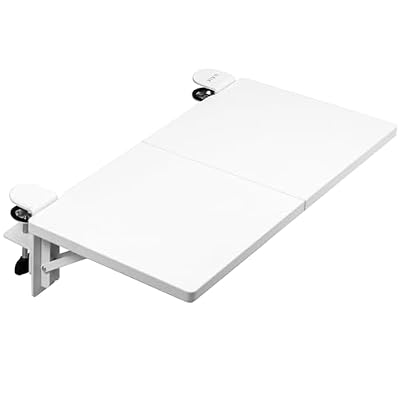
The VIVO DESK-EXT24W is the widest support in this guide, and it suits a different job from the single-arm picks. At 24 by 12 inches, the tray spans the space in front of a keyboard and mouse together, so both forearms rest on one continuous surface. That makes it a strong choice for typists who want both arms supported without buying two separate units.
The tray clamps to the desk edge and folds down when not in use, the same 90-degree folding idea as the smaller BONTEC tray but on a much larger surface. The white finish suits light-colored desks, and the listing confirms the model as DESK-EXT24W with a 24 by 12 inch size. A wide tray needs clear space in front of the desk, so check that a chair can still roll in close.
The flat surface suits people who want a firm, level platform, and it doubles as a keyboard tray or a side table for a notebook. Buyers who only need one elbow supported will find it larger than necessary.
Specs
- Model: DESK-EXT24W
- Mount: clamp-on desk extender
- Surface: 24 x 12 inches
- Adjustment: 90-degree folding design
- Color: white
- Dimensions: not stated
- Weight: not stated
How to choose
Start with the desk. Measure the thickness of the desktop at the edge where the armrest will clamp, and check for a flat edge with clear space underneath. Sloped edges, raised trim, and support rails under the front lip can all block a clamp, and a tray that cannot grip firmly will wobble no matter how good its padding is.
Next, decide how much of the arm needs support. A single rotating arm suits the mouse hand, where the forearm stays in one place. A wide tray suits both forearms together and doubles as extra desk space. A fixed bracket suits a secondary desk where the setup never changes. Height adjustment matters most when the chair and desk heights do not line up, since a pad that sits too high or too low forces the wrist into an awkward angle.
Finally, think about padding. Memory foam and gel feel softer over long sessions but can warm up and compress over time. A firm steel or MDF tray stays flat and level but offers no cushioning.
Who should skip it
Skip a clamp-on armrest if the desk edge is glass, since clamping torque can stress glass tops. Skip it if the desk has a thick live edge or a front support rail that leaves no room for a clamp underneath. People who lean their full upper body weight onto an armrest should also look elsewhere, since clamp-on arms are built for forearm weight, not body weight.
A fixed bracket is the wrong choice for anyone who moves the mouse across a wide area, since it cannot follow the arm. A wide tray is the wrong choice for a small desk with no clearance in front. And anyone whose chair armrests already line up flush with the desktop may not need a desk armrest at all.
Frequently Asked Questions
Do desk armrests really help with forearm pain?
A clamp-on armrest removes the hard desk edge from under the forearm and spreads the weight of the arm across a wider padded surface. That reduces contact pressure on the elbow and wrist and lets the shoulders relax.
How thick of a desk can a clamp-on armrest fit?
Most single-arm rests in this guide fit desks up to about 2.2 to 2.4 inches thick, and the BONTEC tray lists a fit up to 4.4 inches. Always measure the desktop at the exact spot where the clamp will sit.
Can I use two armrests, one on each side of the keyboard?
Yes. Two single-arm units, one on each side of the keyboard, give both forearms support during typing. A wide tray is the simpler alternative, since one tray covers both arms without buying two units.
Will a rotating armrest wobble while I type?
A well-made aluminum or steel pivot stays steady for typing and mouse work when the clamp is tight and the desk edge is flat. Some flex appears if the user leans full body weight onto the pad, which is beyond what these arms are built to carry.
Final verdict
For most PC desks, the VIVO MOUNT-ARM01 is the safest starting point, with rotation and height adjustment that suit both typing and mouse work. The BONTEC EH01 is the better choice for mouse-heavy days, thanks to its 13-inch reach and rotating arm. Budget buyers get solid value from the HONJIE bracket or the foldable BONTEC tray, and anyone who wants both forearms supported at once should look at the wide VIVO 24-inch extender. Measure the desk first and match the form to the work.
Product and ASIN Reference
| Product | ASIN | Value group |
|---|---|---|
| VIVO Universal Clamp-on Adjustable Armrest MOUNT-ARM01 | B07TVVX3VL | mid-range |
| BONTEC Ergonomic Arm Rest Support EH01 | B09BVNR57C | mid-range |
| HONJIE Computer Arm Support Bracket STB-B1 | B092S9W682 | budget |
| BONTEC Ergonomic Desk Extender Tray EH03-US | B0BHT56FLG | budget |
| VIVO Clamp-on Foldable Desk Extender DESK-EXT24W | B0CTFVBSLZ | premium |