A gaming PC, a console, a streaming box, and a work laptop all share one router, and an unmanaged switch treats every packet they send exactly the same. When a big download starts on one machine, game traffic waits in the same queue. A smart-managed switch changes that: its web interface lets you prioritize game traffic with QoS, separate devices onto their own VLANs, stop multicast streams from flooding every port with IGMP snooping, and bond two links together with LAG for extra bandwidth between switches.
- What to Look for in a Managed Switch for Gaming
- 1. TP-Link TL-SG108E — Best 8-Port Managed Switch for Most Gamers
- 2. NETGEAR GS308EP — Best Managed Switch with PoE
- 3. NETGEAR GS305E — Best Compact Managed Switch
- 4. TP-Link TL-SG105E — Best 5-Port Managed Switch
- 5. Zyxel GS1900-16 — Best 16-Port Managed Switch
- Managed Switches Compared
- Frequently Asked Questions
- Conclusion
None of the five switches below needs a command line or a networking certification. They are all smart-managed models: plug them in and they work like any switch, then open a browser when you want control. The lineup runs from a compact 5-port switch for a single desk to a 16-port rackmount unit for a full home network.
As an Amazon Associate, we earn from qualifying purchases.
What to Look for in a Managed Switch for Gaming
Port count. Count every wired device you own today, then add one or two spare ports. A 5-port switch suits a single desk with a PC, a console, and a TV. An 8-port switch covers a whole gaming room. A 16-port switch makes sense in a rack or a wiring closet feeding several rooms.
PoE budget. Power over Ethernet only matters if you plan to power devices through the cable, such as a wireless access point, a security camera, or a VoIP phone. Check the total budget, not just the per-port figure: a switch with 62W across eight PoE ports can run several low-draw devices at once, but it cannot feed eight devices at 30W each. If nothing in your setup needs PoE, skip it.
Management depth. The core four features are QoS, VLANs, IGMP snooping, and LAG. QoS lets game traffic jump the queue. VLANs isolate devices from each other, which keeps smart-home gadgets away from your gaming PC. IGMP snooping keeps multicast traffic, such as IPTV streams, from hitting every port. LAG bonds ports for a faster link to another switch or a NAS. Loop prevention and cable diagnostics are useful extras.
Fanless design and form factor. A switch that lives on a desk or in a bedroom should be fanless; all five picks here are. Desktop and wall-mount models suit a gaming room; a rackmount model with an included kit suits a network rack or a shelf in a closet.
Naming traps. TP-Link now labels its Easy Smart models “Unmanaged Pro” on its own site, even though they offer web-based management with QoS, VLAN, IGMP snooping, and LAG; the listing titles still say Easy Smart. Judge the switch by its feature list, not the label. NETGEAR has a similar naming spread: the GS308EP here is the managed PoE model, the GS308PP is unmanaged PoE, and the plain GS308 is unmanaged with no PoE.
1. TP-Link TL-SG108E — Best 8-Port Managed Switch for Most Gamers
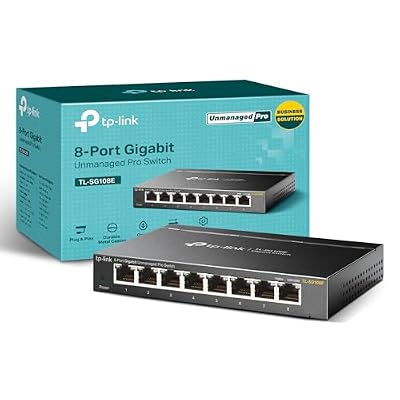
The TL-SG108E is the default pick for a gaming room: eight non-blocking gigabit ports, a metal case, and a web interface that covers the core four management features without any enterprise complexity. Plug it in and it works immediately; open the browser interface or the downloadable utility to set up VLANs, prioritize traffic, or check what is happening on your network. The listing calls it an ideal upgrade from an unmanaged switch for networks that need simple management, and that is exactly the niche it fills.
TP-Link’s energy-efficient technology cuts power draw on idle ports, and the fanless metal housing keeps it silent on a desk. On the naming quirk above: TP-Link’s current site calls this model “Unmanaged Pro,” but the listing title and feature list confirm it is the Easy Smart managed model.
Specs
- Ports: 8 x 10/100/1000 Mbps RJ45, non-blocking
- Management: Web user interface and downloadable utility
- Features: QoS, VLAN, IGMP snooping, LAG, network monitoring
- Case: Metal, fanless
- Mounting: Desktop or wall-mount
- Dimensions: 158 x 101 x 25 mm
- In the box: TL-SG108E, power adapter, installation guide, rubber feet
2. NETGEAR GS308EP — Best Managed Switch with PoE

If your gaming room also hosts a wireless access point, a security camera, or a VoIP phone, the GS308EP powers those devices through the Ethernet cable itself. All eight gigabit ports support PoE+ (802.3at) with a total budget of 62W, so one cable carries data and power to each device. It is a Smart Managed Plus model with VLAN, QoS, and the rest of NETGEAR’s Easy Smart feature set, managed through a web interface.
The 16 Gbps switching bandwidth matches eight full-speed gigabit ports, and the 4K MAC address table with a 192KB packet buffer is ample for a home network. The fanless metal case shares the TL-SG108E’s compact footprint. One detail to confirm before buying: the listing shows a 5-year limited warranty, while NETGEAR’s own product page currently describes a limited lifetime hardware warranty, so the listing copy may predate a warranty change.
Specs
- Ports: 8 x 10/100/1000 Mbps RJ45, all PoE+ (802.3at)
- PoE budget: 62W total
- Management: Easy Smart web interface
- Switching bandwidth: 16 Gbps
- MAC address table: 4K entries; packet buffer: 192KB
- Case: Metal, fanless
- Dimensions: 158 x 101 x 27 mm (6.2 x 4.0 x 1.1 in)
- Weight: 1.08 lb (0.49 kg)
- Warranty: 5-year limited (listing)
3. NETGEAR GS305E — Best Compact Managed Switch

The GS305E brings the same Easy Smart management as its 8-port siblings to a 5-port box barely larger than a deck of cards. It covers the features that matter for a single desk: VLANs for traffic separation, QoS for traffic priority, a cable health check, and loop prevention. The listing notes it is not discontinued by the manufacturer, and it has been on sale since March 2019.
It is the smallest and lightest switch here, and the fanless metal case stays silent. The 128KB packet buffer, 9K jumbo frames, and 8K MAC table are solid for a 5-port unit. With five ports the math is tight: one port goes to the router, leaving four for devices. If your desk holds a PC, a console, a TV, and one spare, it fits; if you expect to add a NAS or a second console, step up to eight ports.
Specs
- Ports: 5 x 10/100/1000 Mbps RJ45
- Management: Easy Smart web interface
- Features: VLAN, QoS, cable health check, loop prevention
- Packet buffer: 128KB; jumbo frames: 9K; MAC table: 8K
- Case: Metal, fanless
- Mounting: Desktop or wall-mount
- Dimensions: 94 x 100 x 27 mm (3.7 x 3.9 x 1.1 in)
- Weight: 0.55 lb (0.25 kg)
- Warranty: 3-year limited
4. TP-Link TL-SG105E — Best 5-Port Managed Switch
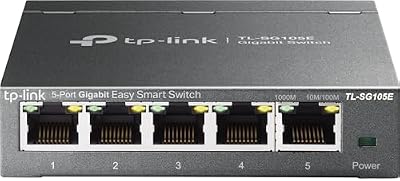
The TL-SG105E is the 5-port counterpart to the TL-SG108E, with the same Easy Smart management in a smaller box. Five non-blocking gigabit ports sit in a metal case measuring 100 x 98 x 25 mm, and the listing is the V2.0 hardware revision, which matters: the web-based interface and DSCP QoS are V2-and-later features. TP-Link’s energy-efficient technology reduces power output by up to 57 percent on this model.
Like its 8-port sibling, it offers network monitoring through the web interface and the management utility, plus QoS, VLAN, IGMP snooping, and LAG, and the listing carries a limited lifetime warranty. Choose this over the NETGEAR GS305E if you want LAG support and IGMP snooping in a 5-port switch; the GS305E’s listed feature set centers on VLAN, QoS, cable diagnostics, and loop prevention instead.
Specs
- Ports: 5 x 10/100/1000 Mbps RJ45, non-blocking
- Management: Web user interface and downloadable utility (V2 and later)
- Features: QoS (including DSCP on V2 and later), VLAN, IGMP snooping, LAG, network monitoring
- Case: Metal, fanless
- Mounting: Desktop or wall-mount
- Dimensions: 100 x 98 x 25 mm
- Energy saving: Up to 57 percent lower power output
- Warranty: Limited lifetime
5. Zyxel GS1900-16 — Best 16-Port Managed Switch

The GS1900-16 is the rack pick. Sixteen gigabit ports with a 32 Gbps non-blocking switching capacity give a home network room to grow, and the web-based setup wizard plus Zyxel’s ZON discovery utility keep configuration simple for a switch of this size. The feature list goes beyond the core four: VLANs, enhanced QoS, IGMP snooping, LAG, IPv6 support, and DoS prevention.
The box includes a rackmount kit alongside the wall-mount kit, so it fits a 19-inch rack, a shelf, or a wall. Two things to know before buying: this model has no PoE and no SFP uplink ports, so every connected device needs its own power and fiber uplinks are not an option. The listing’s interface field wrongly mentions PoE and SFP; the maker datasheet confirms 16 copper RJ45 ports and nothing else.
Specs
- Ports: 16 x 10/100/1000 Mbps RJ45
- Management: Web-based setup wizard and ZON utility
- Features: VLAN, QoS, IGMP snooping, LAG, IPv6, DoS prevention
- Switching capacity: 32 Gbps, non-blocking
- Case: Fanless
- Mounting: Desktop, wall-mount, or 19-inch rack (rackmount kit included)
- Dimensions: 216 x 133 x 42 mm (8.5 x 5.23 x 1.65 in)
- Weight: 2.13 lb (0.97 kg)
- Max power consumption: 10.2 W
- PoE: None; SFP: None
Managed Switches Compared
| Model | Ports | PoE | Management | Form factor |
|---|---|---|---|---|
| TP-Link TL-SG108E | 8 x 1G | No | Web UI + utility | Desktop, wall |
| NETGEAR GS308EP | 8 x 1G | 8 x PoE+ @ 62W | Web UI | Desktop, wall |
| NETGEAR GS305E | 5 x 1G | No | Web UI | Desktop, wall |
| TP-Link TL-SG105E | 5 x 1G | No | Web UI + utility | Desktop, wall |
| Zyxel GS1900-16 | 16 x 1G | No | Web wizard + ZON | Desktop, wall, rack |
The decision comes down to port count first, PoE second. Five ports cover one desk; eight cover a room; sixteen cover a house. Only the GS308EP powers devices over Ethernet, so if you run an access point or a camera, it is the only pick that removes a power adapter from the setup. All five are gigabit-only, so none will carry a 2.5-gigabit link; if your router and PC both have faster ports, a multi-gig switch is a different roundup. All five are fanless and manage through a browser.
Frequently Asked Questions
Do I need a managed switch for gaming, or is unmanaged enough?
An unmanaged switch is enough if you only need more ports and every device on your network gets along. A managed switch earns its place when you want to prioritize game traffic over downloads with QoS, isolate smart-home devices on a VLAN, or stop multicast streams from reaching every port with IGMP snooping. If your games stutter only when someone else starts a big download, QoS addresses exactly that problem.
What is the difference between smart-managed and fully managed switches?
Smart-managed switches, like all five picks here, offer the most-used features through a web interface: VLANs, QoS, IGMP snooping, and LAG. Fully managed switches add a command-line interface, deeper routing features, and enterprise tools such as SNMP configuration and advanced access control. For a home gaming network, smart-managed covers what you will actually use, without the learning curve of enterprise hardware.
How much PoE budget do I need for a gaming setup?
Add up the draw of every device you plan to power over Ethernet. A typical wireless access point draws 10 to 15W, an indoor camera draws 5 to 10W, and a VoIP phone draws 5 to 7W. The GS308EP’s 62W budget covers an access point plus two or three cameras with room to spare. Check the per-port limit too: PoE+ (802.3at) supplies up to 30W per port.
Can I use a managed switch with a PC and a console at the same time?
Yes. A managed switch treats a PC, a console, a TV, and a NAS as ordinary wired devices. The management features work across all of them: put the console and PC in a high-priority QoS class, keep the TV on its own VLAN, and use IGMP snooping so a stream on one device does not slow the others.
Conclusion
A smart-managed switch is a small upgrade that changes how a gaming network behaves under load. The TP-Link TL-SG108E is the safest all-round pick for a gaming room, the NETGEAR GS308EP is the one to buy if anything needs PoE, and the Zyxel GS1900-16 covers a whole house from a rack. The two 5-port models suit a single desk. Whichever you choose, count your devices first, leave a spare port or two, and set up QoS before your next session: it is the feature most likely to make a difference you can feel.