For a desktop gaming PC, the Patriot Viper Venom 32GB (2x16GB) DDR5-6000 CL30 kit is the best overall pick here: it hits the speed and timing combination that Ryzen 7000 and 9000 platforms favor, and it carries both Intel XMP and AMD EXPO profiles. The Viper Elite 5 RGB offers the same numbers with lighting, and the G.Skill Flare X5 is the low-profile choice. A “32GB DDR5 kit” means 32 gigabytes of fifth-generation memory, usually sold as two 16GB sticks that run together in dual channel. Two of the six listings are laptop-format SODIMMs and are covered as runner-ups.
Quick List
- Patriot Viper Venom 32GB DDR5-6000 CL30 – best for AM5 and Intel gaming builds on a sensible budget
- G.Skill Flare X5 32GB DDR5-6000 CL36 – best for tight clearance under big air coolers
- Lexar Thor Z RGB 32GB DDR5-6000 CL38 – best for lighting on a plain, no-fuss kit
- Corsair Vengeance SODIMM 32GB (1x32GB) DDR5-5600 – runner-up for laptop and mini-PC upgrades only
- Timetec 32GB (2x16GB) DDR5-5600 SODIMM – runner-up for laptop upgrades that need a dual-channel pair
- Patriot Viper Elite 5 RGB 32GB DDR5-6000 CL30 – best for fast timings with RGB lighting
Which One Is Right for You?
| If you… | Choose |
|---|---|
| want fast timings and a clean look in a desktop | Patriot Viper Elite 5 RGB or Patriot Viper Venom |
| need the least possible height under a large CPU air cooler | G.Skill Flare X5 |
| care about RGB and accept looser timings | Lexar Thor Z RGB |
| are upgrading a laptop or mini PC with two SODIMM slots | Timetec 32GB (2x16GB) SODIMM |
| have a laptop with one free SODIMM slot and want a single large module | Corsair Vengeance SODIMM 1x32GB |
| run an AMD Ryzen AM5 desktop and want a safe default | Patriot Viper Venom 32GB DDR5-6000 CL30 |
The deciding factor is form factor first, speed second. A standard desktop slot takes a 288-pin DIMM; a laptop uses a shorter 262-pin SODIMM, and the two are not interchangeable. After that, the timing numbers separate good kits from merely adequate ones.

Patriot Viper Venom DDR5 RAM 32GB (2X16GB) 6000MHz CL30 Desktop Memory | Voltage: 1.35v; Supports Intel XMP and AMD EXPO; Module type: UDIMM.
Included for '6 Best 32gb DDR5 RAM Kits (October 2026) Buying Guide' as a relevant option in this category; details come from the product listing.
View on Amazon
G.SKILL Flare X5 Series DDR5 RAM (AMD EXPO & Intel XMP 3.0) 32GB (2x16GB) Up to 6000MT/s* CL36-36-36-96 1.35V Desktop Computer Memory U-DIMM - Matte Black (F5-6000J3636F16GX2-FX5)
Included for '6 Best 32gb DDR5 RAM Kits (October 2026) Buying Guide' because the listing specifies Matte Black (F5-6000J3636F16GX2-FX5), details this guide uses to compare options.
View on Amazon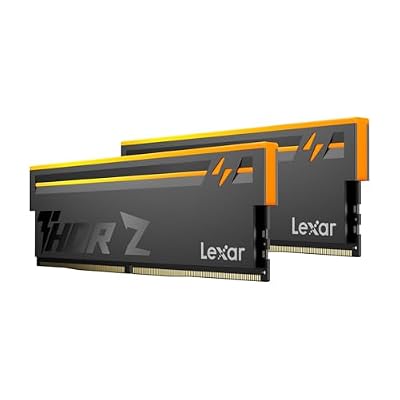
Lexar Thor Z RGB DDR5 RAM 32GB Kit (2x16GB) 6000MHz CL38 DRAM 288-Pin UDIMM | Supports Intel XMP 3.0 & AMD EXPO On-die ECC, PMIC, 1.35V High-Performance PC Computer Memory for Gaming, AI
Included for '6 Best 32gb DDR5 RAM Kits (October 2026) Buying Guide' because the listing specifies Supports Intel XMP 3.0 & AMD EXPO On-die ECC and PMIC, details this guide uses to compare options.
View on Amazon
CORSAIR Vengeance SODIMM DDR5 RAM 32GB (1x32GB) Up to 5600MHz CL48 Intel XMP 3.0 Desktop Computer Memory - Black (CMSX32GX5M1A5600C48)
Included for '6 Best 32gb DDR5 RAM Kits (October 2026) Buying Guide' because the listing specifies Black (CMSX32GX5M1A5600C48), details this guide uses to compare options.
View on Amazon
Timetec Premium 32GB KIT(2x16GB) DDR5 5600MHz PC5-44800 Unbuffered Non-ECC 1.1V CL46 1Rx8 Single Rank 262 Pin SODIMM Laptop Memory RAM Upgrade
Included for '6 Best 32gb DDR5 RAM Kits (October 2026) Buying Guide' as a relevant option in this category; details come from the product listing.
View on Amazon
Patriot Viper Elite 5 RGB DDR5 RAM 32GB (2X16GB) 6000MT/s CL30 RGB Memory | Voltage: 1.35v; Supports Intel XMP and AMD EXPO; Module type: UDIMM.
Included for '6 Best 32gb DDR5 RAM Kits (October 2026) Buying Guide' as a relevant option in this category; details come from the product listing.
View on AmazonAll 6 Picks in Detail
1. Patriot Viper Venom 32GB DDR5-6000 CL30 – Best for a balanced gaming desktop
As an Amazon Associate we earn from qualifying purchases at no extra cost to you.
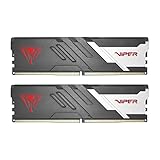
The Viper Venom is the kit to start with for a new desktop. DDR5-6000 with CL30 timings is widely treated as the sweet spot for Ryzen AM5 systems, and it is equally comfortable on current Intel boards. It carries both XMP and EXPO profiles, so you enable one setting in the BIOS and you are done. It is a plain, non-lit design, which keeps the focus on speed and compatibility.
- Capacity: 32GB kit, 2x16GB
- Speed and timing: DDR5-6000, CL30
- Voltage: 1.35V per the listing
- Profiles: Intel XMP and AMD EXPO
- Module type: UDIMM for desktop motherboards
Pros
- Tight CL30 timings at a mainstream speed
- Works with both major platforms through one kit
Cons
- Heat spreaders are taller than low-profile kits
- Does not offer lighting
Compared with the Viper Elite 5 RGB, you get the same rated speed and timings without paying for lights.
This kit suits builders who want a straightforward install: slot the two sticks into the second and fourth positions counted from the CPU, as most manuals recommend, load the profile and move on. It is also a sound match for a first-time build, since the dual-profile support removes any guesswork about platform compatibility. If your motherboard maker publishes a qualified memory list, check that the Patriot part number appears on it, or at least that the model is common on the list.
2. G.Skill Flare X5 32GB DDR5-6000 CL36 – Best for low-profile builds

The Flare X5 is a compact, AMD-oriented kit with EXPO and XMP 3.0 support. Its low heat spreader is the main draw: it leaves room for large tower coolers that overhang the first memory slot. The listing gives the timings as CL36-36-36-96 at 1.35V, which is looser than the CL30 kits but perfectly good for gaming at 6000 MT/s.
- Capacity: 32GB kit, 2x16GB
- Speed and timing: up to DDR5-6000, CL36-36-36-96
- Voltage: 1.35V
- Profiles: AMD EXPO and Intel XMP 3.0
- Module type: desktop U-DIMM
Pros
- Low profile improves cooler clearance
- Familiar brand with broad motherboard validation
Cons
- CL36 timings are looser than the CL30 kits
- No lighting
Choose it over the Viper Venom when physical clearance is the limiting factor rather than latency.
The Flare X5 line has long been associated with AMD systems, and its profile support makes it a natural partner for Ryzen builds in small or crowded cases. It is also a good fit when you plan to use a large dual-tower cooler and need every millimeter around the CPU socket. Measure the clearance between the cooler fins and the first DIMM slot, then compare that figure with the module height on the product page.
3. Lexar Thor Z RGB 32GB DDR5-6000 CL38 – Best for RGB on a budget kit
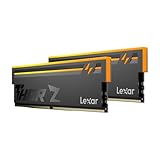
The Thor Z RGB gives you addressable lighting at DDR5-6000 with looser CL38 timings. According to the listing it supports both Intel XMP 3.0 and AMD EXPO, includes on-die ECC and an onboard power management chip, and runs at 1.35V. It is a sensible option when appearance matters and you do not need the tightest latency.
- Capacity: 32GB kit, 2x16GB
- Speed and timing: DDR5-6000, CL38
- Voltage: 1.35V
- Profiles: Intel XMP 3.0 and AMD EXPO
- 288-pin UDIMM with on-die ECC and PMIC
Pros
- RGB lighting with both platform profiles
- Standard 6000 MT/s speed
Cons
- CL38 is the slowest timing set among the desktop kits
- Less established in enthusiast circles than larger brands
Next to the Viper Elite 5 RGB, it trades about 2.7 nanoseconds of first-word latency for a different look.
It makes the most sense in a build where the memory is visible through a glass panel and you already have lighting elsewhere in the case. Because the extra latency is small, most players would not feel it in a game, but anyone chasing the absolute lowest latency should look at the CL30 kits instead. Check that your motherboard lighting header and software can control the module lights before you commit to the look.
4. Corsair Vengeance SODIMM 32GB (1x32GB) DDR5-5600 – Runner-up for laptops and mini PCs

This listing does not belong in a desktop build, even though its title mentions desktop computer memory. It is a SODIMM, the short format used in laptops and many mini PCs, and it will not fit a standard desktop DIMM slot. It is a single 32GB module, so on its own it runs in single channel unless you pair it with a second identical module. Treat it as a laptop upgrade option, not a gaming desktop pick. Before buying, look up your laptop model or mini PC in the memory support table published by its maker. Some machines accept only up to a certain capacity per slot, and some have soldered memory with a single open slot, which is exactly where a single large module is useful.
- Capacity: one 32GB module
- Speed and timing: up to DDR5-5600, CL48
- Profile: Intel XMP 3.0 listed; laptop BIOS support varies
- Format: SODIMM for laptops and small-form-factor machines
- Confirm voltage and compatibility on the listing
Pros
- Large single module leaves a second slot free
- Recognized module brand
Cons
- Will not fit desktop motherboards
- Single channel unless you add a matching module
If your laptop has two SODIMM slots, the Timetec dual-module kit below is the more direct way to get 32GB in dual channel.
5. Timetec 32GB (2x16GB) DDR5-5600 SODIMM – Runner-up for dual-channel laptop upgrades

Like the Corsair above, this is a laptop-format kit, not a desktop one. The listing describes two 16GB 262-pin SODIMMs, DDR5-5600 (PC5-44800), CL46, 1.1V, single-rank and non-ECC. That makes it a straightforward way to take a two-slot laptop to 32GB in dual channel at standard JEDEC-style voltage, with no overclock profile involved.
- Capacity: 32GB kit, 2x16GB
- Speed and timing: DDR5-5600, CL46
- Voltage: 1.1V, unbuffered non-ECC
- Single rank, 262-pin SODIMM
- Check your laptop’s maximum supported speed before buying
Pros
- Dual channel out of the box
- Low 1.1V voltage keeps heat modest
Cons
- Not usable in desktops
- CL46 timings and no tuning profiles
It is the better laptop pick of the two SODIMM listings if both slots are available.
Because it ships as a matched pair, it is simpler than buying two separate modules, and it matches how most manufacturers configure two-slot notebooks. Remember that an upgrade from a single stick to a pair means removing the old module, so check that you can reuse or sell it. Keep the laptop BIOS up to date, as memory compatibility fixes arrive through those updates.
6. Patriot Viper Elite 5 RGB 32GB DDR5-6000 CL30 – Best for fast timings with lighting

The Viper Elite 5 RGB combines the same DDR5-6000 CL30 rating as the Venom with an addressable lighting bar. It supports XMP and EXPO, runs at 1.35V and uses UDIMM modules. If you want your memory to light up without slowing down timings, this is the simplest choice in the list.
- Capacity: 32GB kit, 2x16GB
- Speed and timing: DDR5-6000, CL30
- Voltage: 1.35V
- Profiles: Intel XMP and AMD EXPO
- Module type: UDIMM; lighting software compatibility is listed on the product page
Pros
- CL30 timings plus RGB
- Broad platform profile support
Cons
- Taller than low-profile kits
- Costs more than the non-lit sibling
Versus the Viper Venom, the performance is the same on paper, so you are choosing lighting only.
It is the natural pick for an enthusiast build that pairs fast memory with a themed case. The lights are the visible difference, but the kit also sits in the higher-tier Patriot line, aimed at buyers who plan to tune their memory. Look at the lighting control options on the product page, and make sure your case allows enough space above the DIMM slots for the taller light bar.
Specs Compared
| Kit | Capacity | Speed | Timings | Voltage | Format | Profiles |
|---|---|---|---|---|---|---|
| Patriot Viper Venom | 2x16GB | DDR5-6000 | CL30 | 1.35V | Desktop UDIMM | XMP, EXPO |
| G.Skill Flare X5 | 2x16GB | Up to DDR5-6000 | CL36-36-36-96 | 1.35V | Desktop U-DIMM | EXPO, XMP 3.0 |
| Lexar Thor Z RGB | 2x16GB | DDR5-6000 | CL38 | 1.35V | Desktop UDIMM | XMP 3.0, EXPO |
| Corsair Vengeance SODIMM | 1x32GB | Up to DDR5-5600 | CL48 | Confirm on listing | Laptop SODIMM | XMP 3.0 |
| Timetec 32GB kit | 2x16GB | DDR5-5600 | CL46 | 1.1V | Laptop SODIMM, 262-pin | None listed |
| Patriot Viper Elite 5 RGB | 2x16GB | DDR5-6000 | CL30 | 1.35V | Desktop UDIMM | XMP, EXPO |
How We Chose These
We worked from the six listings supplied for this page and compared them using manufacturer specification pages, retailer listing fields and published platform memory guidance. The criteria were form factor, rated speed, CAS latency, voltage, profile support (XMP and EXPO), module layout and cooler clearance. We did not run our own memory tests, so we do not quote benchmark results. Where the listing title did not state a value, such as voltage on one SODIMM, we say so and point you to the product page. Laptop-format modules are placed as runner-ups because they do not suit the desktop buyers most likely to read a “best DDR5 kit” list. We also read each product listing name closely, noted anything that looked inconsistent between sources, and kept the wording cautious wherever a specification could not be verified from a manufacturer page.
What to Look For
Speed and CAS latency work together
Speed is measured in megatransfers per second and latency in clock cycles, so you need both to judge a kit. A rough first-word latency in nanoseconds is the CAS number times 2000 divided by the transfer rate. DDR5-6000 CL30 works out to 10.0 ns, CL36 to 12.0 ns and CL38 to about 12.7 ns. A DDR5-5600 SODIMM at CL46 lands near 16.4 ns, and CL48 near 17.1 ns. Lower is better, which is why CL30 kits are usually preferred for gaming even though all three desktop kits are rated at 6000 MT/s.
The 6000 sweet spot on AMD and Intel
AMD Ryzen 7000 and 9000 processors run their memory controller and Infinity Fabric in a one-to-one relationship at around 3000 MHz memory clock, which corresponds to DDR5-6000. Going much faster often forces a ratio change that can cancel the benefit. Recent Intel platforms support higher official speeds, but 6000 to 6400 remains a safe, widely stable target. Enable the EXPO or XMP profile in the BIOS after installing the kit, because DDR5 boots at a slow default speed without it.
Capacity, channels and slot count
For gaming, 32GB is the current comfortable level: it covers modern titles, a browser, voice chat and streaming software at the same time. Buy a two-stick kit rather than one big stick, because two modules give you dual channel. Filling all four slots with four sticks makes the memory controller work harder and often lowers the top stable speed, so choose two 16GB modules now, or two 32GB modules later, rather than four small ones.
Form factor: DIMM versus SODIMM
Desktop memory is a 288-pin DIMM about 133 mm long. Laptop memory is a 262-pin SODIMM roughly half that length. They use different notches, so you physically cannot force one into the other’s socket. Many laptops also ignore XMP profiles and run modules at the speed set by the manufacturer, so a 5600 MT/s SODIMM may run slower than its label in a given laptop.
Worked example
Suppose you have a Ryzen 7 AM5 system with a tower air cooler. You want 32GB, you do not need lighting, and the cooler overlaps the first slot by a few millimeters. A low-profile 2x16GB kit at DDR5-6000 solves the clearance issue, while a CL30 kit gives you about 2 ns lower first-word latency than a CL36 kit. If the clearance is fine, the CL30 kit wins; if the cooler is tight, accept CL36 for the lower profile.
Ranks, ECC and other labels explained. Single-rank modules, such as the 1Rx8 Timetec listing, have one set of chips and tend to be easier on the memory controller, while dual-rank modules can offer slightly better performance at the same speed but are harder to run at high clocks. DDR5 also includes on-die ECC in every chip, which corrects errors inside the chip itself and is different from the full ECC found on server memory. A listing that says non-ECC means the module does not add the extra data bits that full ECC requires. An onboard power management chip, called a PMIC, is standard on all DDR5 and moves voltage regulation from the motherboard to the module, which is why voltage appears on the label.
Upgrading an existing system. If you already own 16GB of DDR5, adding a second kit is rarely the best path. The safest upgrade is to replace the old pair with a single matched 32GB kit and sell or reuse the old modules elsewhere. Before buying, find the part number of your motherboard and read its memory support page. It lists the maximum capacity per slot, supported speeds with two or four modules and any BIOS version required for specific kits. Updating the BIOS first is a smart habit, because early AM5 and Intel 800-series boards received significant memory compatibility improvements through firmware.
Getting the most from the kit after install. Install the two modules in the slots your motherboard manual names for dual channel, usually the second and fourth slots counted outward from the CPU. Update the BIOS if you are on an early release, then enable the XMP or EXPO profile and save. If the system fails to boot at the rated speed, clear the CMOS and try again with a slightly higher memory voltage only if your board offers a documented option, or fall back to a lower speed such as 5600 MT/s. Run a memory stability tool for a few passes before you trust the build with important work. A kit that passes a long run at its rated speed is generally stable for gaming.
Questions
Is 32GB of DDR5 enough for gaming?
Yes. It covers current games with room for background apps. Moving to 64GB is mainly useful for heavy video editing, virtual machines or large creative projects.
Should I choose CL30 or CL36 at DDR5-6000?
CL30 has lower first-word latency, so it is the stronger pick if the price is close. The real-world difference in games is small, so do not give up cooler clearance or compatibility just to gain a few percent.
Can I use laptop SODIMM memory in a desktop?
No. The module length and notch are different, so it will not seat in a standard desktop slot. Buy a 288-pin UDIMM kit for desktops.
Do I need to enable XMP or EXPO?
Yes. Without the profile the kit runs at a slower default speed. Enter the BIOS after assembly, select the XMP or EXPO profile, save and reboot.
Are RGB kits slower than plain kits?
Not by themselves. Speed and timings are set by the memory chips and the profile, so an RGB kit with the same numbers performs the same. Lighting software can add background processes, so some builders prefer to set the lighting once and close the app.
Can I mix two different DDR5 kits?
It is possible, but it is risky. Mixed kits often force lower speeds or fail to boot at their rated settings, so buy one matched kit in the capacity you want.
Update History
- October 14, 2026 – Initial publication; product set drawn from current catalog listings.
- Check the product page for current specifications and availability before buying.
Sources
- Manufacturer product and specification pages for Patriot, G.Skill, Lexar, Corsair and Timetec
- Retailer listing titles and specification fields
- JEDEC DDR5 and SODIMM format definitions
- AMD EXPO and Intel XMP 3.0 memory profile documentation