Snapdragon vs intel common mistakes to avoid starts with one practical question: will your apps, drivers, games, and accessories behave correctly on the processor you choose? This guide compares four real Windows laptops and shows where battery life, compatibility, graphics, display quality, ports, and portability actually matter.
How to Choose Snapdragon vs Intel Laptops
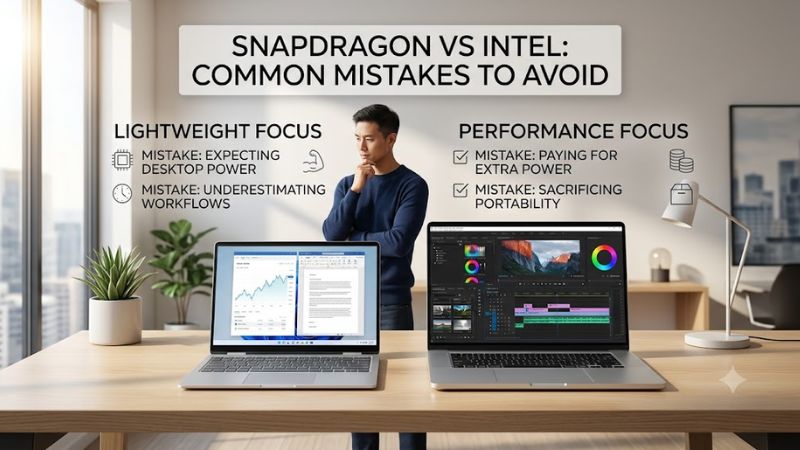
The biggest buying errors happen when shoppers compare processor labels instead of complete laptops. For snapdragon vs intel common mistakes to avoid, focus on the workload first, then match software support, battery priorities, graphics needs, and connectivity. The four picks below represent those tradeoffs clearly in practice.
Check Software and Driver Compatibility
Start with software architecture, because Snapdragon X systems use Windows on Arm while Intel Core Ultra systems run the traditional x86 Windows environment. Most common apps now run well on Arm, but specialized utilities, older plug-ins, security tools, and hardware-dependent software may still behave differently under emulation.
For snapdragon vs intel common mistakes to avoid, verify every must-have application and peripheral before buying, especially anything that installs a driver. Microsoft Surface Laptop 7 and Dell XPS 13 9345 are strong Arm choices for mainstream work, while ASUS Zenbook S 14 and Lenovo Slim 7i Aura Edition reduce compatibility risk.
Compare Complete Battery Configurations
Battery claims are easy to misuse because vendor tests differ by screen brightness, resolution, refresh rate, and workload. Snapdragon laptops can be exceptionally efficient, yet an OLED panel, heavy browser load, video conferencing, or emulated software can narrow the advantage. Compare the entire configuration, not the CPU family alone.
Microsoft Surface Laptop 7 favors balanced endurance with a 13.8-inch display, while Dell XPS 13 9345 can pair Snapdragon X Elite with a lower-power FHD+ panel. ASUS Zenbook S 14 and Lenovo Slim 7i Aura Edition show that Intel Core Ultra 7 258V machines can also deliver strong mobility without leaving x86 software behind.
Match Integrated Graphics to Your Workload
Integrated graphics matter if you edit video, use GPU-accelerated creative apps, connect high-resolution monitors, or play light games. Intel Core Ultra 7 258V includes Arc 140V graphics, while Snapdragon X Elite relies on Qualcomm Adreno graphics. Performance varies by software optimization, so benchmark relevance matters more than branding.
For snapdragon vs intel common mistakes to avoid, choose graphics around your real applications rather than a synthetic score. ASUS Zenbook S 14 and Lenovo Slim 7i Aura Edition suit users who value mature Intel graphics support, while Surface Laptop 7 and XPS 13 9345 make more sense when efficiency and mainstream productivity lead.
Count Ports Before Comparing Processors
Ports and display choices often matter more than a small processor difference. Surface Laptop 7 includes USB-A plus two USB-C/USB4 ports, while Dell XPS 13 9345 uses only two USB4 Type-C ports. The Intel options add broader connectivity in different ways, so dock dependence and monitor needs should be considered before checkout.
Lenovo Slim 7i Aura Edition is the most flexible here with Thunderbolt 4, HDMI, USB-A, and microSD, while ASUS Zenbook S 14 also offers a practical creator-friendly mix. Surface Laptop 7 is balanced for general use, and XPS 13 9345 is best for buyers comfortable carrying a compact USB-C hub or using wireless accessories.
Top Picks
These four laptops make the snapdragon vs intel common mistakes to avoid easier to see in real hardware. The Snapdragon models emphasize efficiency and quiet mobile use, while the Intel Core Ultra 7 258V models prioritize familiar x86 compatibility and capable Arc graphics. None is universally best, so match the platform to your workload.
| Product | Best For | Key Spec | Watch Out For |
|---|---|---|---|
| Microsoft Surface Laptop 7 13.8-inch | Best Overall | Snapdragon X Elite, 2304 x 1536, up to 120Hz | Check Arm64 software and driver support |
| Dell XPS 13 9345 | Best For Travel | Snapdragon X Elite, 55Wh battery, 13.4-inch display | Only two USB4 Type-C ports |
| ASUS Zenbook S 14 UX5406SA | Best For Creators | Core Ultra 7 258V, up to 3K 120Hz OLED | OLED configuration can use more power |
| Lenovo Slim 7i Aura Edition 14 | Best Value | Core Ultra 7 258V, 70Wh battery, multiple ports | Memory is soldered |
Microsoft Surface Laptop 7 13.8-Inch — Best Overall
Microsoft Surface Laptop 7 13.8-inch with Snapdragon X Elite is the Best Overall pick for users who live in Microsoft 365, browsers, video calls, and mainstream creative software. Its 12-core Snapdragon option, 2304 x 1536 PixelSense Flow display, up-to-120Hz refresh rate, USB-A, and dual USB4 ports create a balanced daily system.
The main advantage is the polished mix of portability, display quality, touch support, and strong Arm efficiency. The real drawback is platform dependence: a legacy app or peripheral driver can still be the deciding factor. Buyers should verify specialist software before purchase instead of assuming Windows compatibility is identical across CPUs.
Dell XPS 13 9345 — Best For Travel
Dell XPS 13 9345 with Snapdragon X Elite is the Best For Travel option. It starts around 2.6 pounds, uses a 55Wh battery, supports up to 64GB LPDDR5X memory, and offers 13.4-inch FHD+, QHD+, or 3K OLED displays. The FHD+ 120Hz configuration is attractive when portability, low weight, and battery efficiency matter most.
For snapdragon vs intel common mistakes to avoid, this model shows why chassis design matters as much as processor choice. The XPS is compact and premium, but its two USB4 Type-C ports create real adapter dependence. It is a smart travel machine for cloud-heavy workflows, but less convenient for users with many wired accessories.
ASUS Zenbook S 14 UX5406SA — Best For Creators
ASUS Zenbook S 14 UX5406SA with Intel Core Ultra 7 258V is the Best For Creators pick. The processor has eight cores, Arc 140V-class integrated graphics, and an NPU rated up to 47 TOPS, while available 14-inch OLED panels reach 3K resolution and 120Hz. That combination favors visual work and broad Windows software support.
Its strongest point is the blend of a high-quality OLED screen, modern Intel graphics, and conventional x86 compatibility. The tradeoff is that OLED panels can consume more power than simpler displays, especially at high brightness or refresh rates. Choose it when display quality and creative-app familiarity outweigh unplugged endurance.
Lenovo Slim 7i Aura Edition 14 — Best Value
Lenovo Slim 7i Aura Edition 14 with Intel Core Ultra 7 258V is the Best Value pick for users who want balanced specs and useful ports. A representative configuration combines 32GB LPDDR5X-8533 memory, a 1TB PCIe 4.0 SSD, Arc 140V graphics, a 70Wh battery, and a 14-inch 1920 x 1200 OLED touchscreen for flexible daily work.
The practical advantage is connectivity: two Thunderbolt 4 ports, HDMI 2.1, USB-A, microSD, and a headphone jack reduce dock dependence. Its limitation is soldered memory, so capacity should be chosen correctly at purchase. For office, study, development, and mixed creative work, it offers a reassuringly conventional Intel experience.
Frequently Asked Questions
The most useful snapdragon vs intel common mistakes to avoid questions are not about which chip wins a generic benchmark. Buyers usually need to know whether Arm software support is good enough, whether Intel is still safer for legacy tools, how gaming differs, and which platform fits long battery-focused work. Those answers depend on workload.
Can Snapdragon X Laptops Run Normal Windows Apps?
Yes, Snapdragon X laptops can run most everyday Windows applications, including many native Arm versions and x86 or x64 apps through Windows 11 emulation. The important exception is software that depends on architecture-specific drivers or low-level components, including some security utilities, specialty peripherals, and professional tools.
Before buying, make a short list of critical programs and accessories, then confirm Arm64 support for anything business-critical. Mainstream browsers, Microsoft 365, communication apps, and many creative tools are increasingly well supported. A single incompatible driver, however, can matter more than hours of extra battery life.
Is Intel Safer for Legacy Windows Software?
Intel is still the safer default when your workflow depends on older Windows software, niche plug-ins, custom enterprise tools, or peripherals with uncertain Arm support. Core Ultra 7 258V laptops also bring modern efficiency, strong integrated graphics, and Copilot+ capability, so Intel no longer automatically means poor mobility.
For snapdragon vs intel common mistakes to avoid, do not treat compatibility as a vague fear; test your actual stack. If every essential app is Arm-native or proven under emulation, Snapdragon can be excellent. If one critical program needs an unsupported driver or anti-cheat component, an Intel model is the more predictable purchase.
Is Snapdragon or Intel Better for Gaming?
Intel is generally the easier gaming choice because the Windows gaming ecosystem, graphics drivers, anti-cheat systems, and older titles were built around x86 PCs. Snapdragon gaming has improved, but compatibility still varies by title and protection technology. A gaming-first buyer should research exact games before purchase.
If gaming is secondary, either platform can make sense, especially for cloud gaming or lightweight titles. Buyers focused on local gaming should prioritize game compatibility, GPU behavior, refresh-rate needs, and charger expectations. None of these four laptops replaces a dedicated gaming notebook, so avoid choosing solely from CPU marketing.
Which Platform Is Better for Battery Life?
Snapdragon is often attractive for long unplugged productivity, but Intel Core Ultra 200V laptops can also be highly efficient. Screen technology, battery capacity, background software, wireless activity, and workload intensity affect results. A low-power IPS configuration can outlast a brighter OLED model with comparable processor efficiency.
The best method is to compare battery tests that match your usage, then check the exact display and battery configuration you plan to buy. Surface Laptop 7 and XPS 13 9345 favor mobility, while Zenbook S 14 and Slim 7i Aura Edition provide competitive endurance with broader x86 familiarity and strong integrated graphics.
Final Thoughts
The real lesson from snapdragon vs intel common mistakes to avoid is to buy around your software, drivers, ports, display, and daily workload rather than processor branding alone. Surface Laptop 7 and XPS 13 9345 reward Arm-ready users, while Zenbook S 14 and Slim 7i Aura Edition are safer when broad x86 compatibility matters most.