The best compact mini fridge for a PC setup is a 1.6–1.8 cubic foot compressor cube with a reversible door, Energy Star certification and a running draw under about 90 W, placed on the opposite side of the desk from your PC’s front intake and plugged into a different outlet than your UPS. That combination gives properly cold drinks, keeps the fridge’s exhaust heat out of your case, and avoids the power problems that catch out a lot of builders.
What Makes a PC Setup Different From Any Other Room
Most mini fridge guides treat the fridge in isolation. In a gaming or workstation setup, the fridge shares three resources with your PC: floor space near the desk, the electrical circuit, and the air around the case. Getting those right matters more than the brand name on the door.

Antarctic Star Compact Mini Fridge, 10L Portable Small Refrigerator, 2.6 Gal Desktop Fridge with AC/DC Adapters, Small Cosmetics Cooler for Beverage, Food, Makeup, Bedroom, Office, Dorm, White
Included for 'Best Compact Mini Fridge for PC Setup: Power, Airflow and Placement' because the listing specifies 10L Portable Small Refrigerator and 2.6 Gal Desktop Fridge with AC/DC Adapters, details this guide uses to compare options.
View on Amazon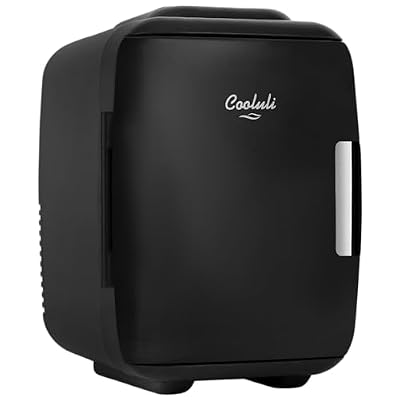
Cooluli Mini Fridge for Bedroom - Car, Office Desk & Dorm Room - Portable 4L/6 Can Electric Plug In Cooler & Warmer for Food, Drinks, Skincare Beauty & Makeup - 12v AC/DC & Exclusive USB Option, Black
Included for 'Best Compact Mini Fridge for PC Setup: Power, Airflow and Placement' because the listing specifies Car and Office Desk & Dorm Room, details this guide uses to compare options.
View on AmazonCompact Fridge Classes for a Gaming Desk
| Class | Capacity | Outer size (W × D × H) | Running draw | Noise | Usual price range |
|---|---|---|---|---|---|
| Desktop thermoelectric | 4–10 L | about 20 × 28 × 28 cm | 40–60 W nearly constant | 28–38 dB constant | usually $35–$110 |
| Compressor cube | 1.6–1.8 cu ft | about 44 × 48 × 50 cm | 60–85 W while running | 36–40 dB while running | usually $120–$220 |
| Compressor compact, taller | 2.5–3.3 cu ft | about 47 × 50 × 80 cm | 70–95 W while running | 38–42 dB while running | usually $160–$300 |
| Glass-door beverage cooler | 60–100 cans | about 43 × 48 × 70 cm | 70–100 W while running | 38–42 dB while running | usually $180–$350 |
The 1.6–1.8 cu ft cube is the sweet spot for a mini fridge for a gaming desk: it slides under a standard 73–75 cm high desk with room to spare, holds 30–40 cans or a mix of drinks and snacks, and reaches real fridge temperatures.
Worked Example: Can Your Circuit Handle the PC and the Fridge?
A standard North American 15 A, 120 V circuit supplies 1,800 W, and the safe continuous load is 80% of that, or 1,440 W. Bedrooms often share one circuit across several outlets, so add up everything on it.
| Device | Mid-range build | High-end build |
|---|---|---|
| Gaming PC under load (at the wall) | RTX 5070-class system: about 450 W | RTX 5090-class system: about 850 W |
| Two monitors | about 70 W | about 120 W |
| Speakers, lighting, chargers | about 40 W | about 60 W |
| Compressor mini fridge (running) | about 80 W | about 80 W |
| Total running load | about 640 W | about 1,110 W |
| Headroom to 1,440 W | about 800 W | about 330 W |
The mid-range setup has plenty of margin. The high-end setup is fine on its own, but add a 1,500 W space heater, a portable air conditioner or a laser printer on the same circuit and the breaker will trip, usually at the moment the fridge compressor starts, because a compressor briefly pulls several times its running current for a fraction of a second when it kicks in. On 230 V circuits common outside North America, the headroom is much larger, but the principle of adding up the load still applies.
Never Put the Fridge on Your UPS
It is tempting to plug everything at the desk into the battery backup. Do not include the fridge.
- The compressor startup surge can overload a small 600–900 VA consumer UPS and cause it to shut off or switch to bypass, taking your PC down with it.
- Many budget UPS units output a stepped approximation of a sine wave on battery, which makes motor-driven appliances run hot and noisy.
- The fridge would drain the battery that should be giving your PC time to save and shut down cleanly.
Plug the fridge straight into a wall outlet, ideally one on a different circuit if your room has one.
Airflow: Keep Fridge Heat Out of Your Case
A fridge does not destroy heat; it moves it from inside the box to the coils on its back and sides. A compressor cube averages around 25–35 W of heat output over time, and a thermoelectric unit around 40–50 W, all released right next to your desk.
- Place the fridge on the side away from the PC’s front intake. If the fridge’s warm rear is within about 30 cm of the intake fans, your components breathe slightly warmer air, which can add a degree or two to GPU and CPU temperatures and nudge fan speeds up.
- Do not stack the fridge under or beside a case exhaust. Hot PC exhaust raises the air temperature around the fridge coils, so the compressor runs longer and louder.
- Leave 5–10 cm of gap behind and beside a compressor fridge and 10 cm behind a thermoelectric fan.
- Avoid enclosed desk cubbies unless the back is open. A trapped fridge in a closed cabinet can also warm a nearby case that has a bottom intake.
Noise in a Quiet Build
If you have tuned your build to run near-silent, a fridge can easily become the loudest thing in the room. A small fridge for a bedroom should be rated at about 38 dB or below. Two tricks help a lot:
- Set the fridge on a rubber anti-vibration mat. Much of the hum is the cabinet resonating against the floor or a desk panel.
- Keep it on the floor rather than on the desk surface, where vibration travels into the desk and your microphone arm.
A thermoelectric unit is often marketed as the quiet compact fridge choice, but its fan runs continuously; a compressor cube is silent most of the hour and audible only while cycling. Which one bothers you more depends on whether a steady hum or an occasional click-and-hum is harder to ignore.
Decision Matrix for Builders
| Your setup | Best fit |
|---|---|
| Under-desk space next to a mid-tower | 1.6–1.8 cu ft compressor cube, on the side away from the intake |
| Small-form-factor PC on the desk, no floor space | 4–6 L thermoelectric on the desk, kept away from the SFF intake |
| High-end build sharing a bedroom circuit | Energy Star compressor cube, nothing else heavy on the circuit |
| RGB showcase setup | Glass-door beverage cooler with switchable interior light |
| Streaming room with a condenser mic | Compressor cube on the floor behind the mic’s rejection side |
Setup Checklist
- Measure under-desk height and depth, and leave clearance for the door swing.
- Confirm the hinge can be reversed so the door opens away from your chair.
- Add up everything on the circuit and stay below 80% of its rating.
- Plug the fridge into the wall, never into the UPS or a cheap thin power strip.
- Keep it away from the PC intake and exhaust paths.
- Let a delivered compressor fridge stand upright for a few hours before switching it on.
Treat the mini fridge as part of the build, with its own power, airflow and noise budget, and it becomes a convenient upgrade rather than a source of breaker trips and warmer GPU temps.