Common mistakes when buying a prebuilt gaming pc can leave buyers with overpriced systems that struggle under load. Many gamers fall for flashy RGB lighting while ignoring slow storage or weak cooling. Understanding component quality helps you choose a rig that delivers smooth frame rates and reliable long-term value.

How to Choose the Right Desktop Without Common Pitfalls
Selecting a system requires careful balance across core hardware to avoid common mistakes when buying a prebuilt gaming pc. Prioritize verified component specifications rather than marketing labels. A well-balanced desktop delivers reliable speed and easy upgrades.
Check Power Supply Unit Quality and Wattage
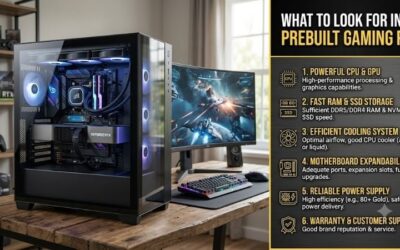
Unbranded power supplies are frequent prebuilt desktop pitfalls that cause system crashes under heavy gaming workloads. Cheap units lack adequate wattage headroom and basic safety certifications. Always verify that the power supply carries an 80 Plus rating and sufficient wattage for future graphic card upgrades.
Ignoring power supply quality is one of the common mistakes when buying a prebuilt gaming pc. High-quality power delivery protects your GPU and CPU from damaging voltage spikes. Choosing a power unit from a reputable brand ensures quiet operation, high energy efficiency, and total operational stability for years.
Evaluate CPU and GPU Hardware Balance
Pairing an ultra-fast CPU with a weak graphics card creates a severe gaming rig bottleneck in modern titles. Prebuilt listings often advertise top-tier processor names to hide underpowered GPUs. Always evaluate benchmark scores for the combined hardware pair to ensure target frame rates at your desired resolution.
Achieving proper GPU and CPU balance guarantees that neither component limits your gaming performance. A balanced setup delivers smooth frame pacing in demanding games. Investing in a strong graphics processor yields far higher framerate gains than buying an overly expensive central processor for everyday gaming.
Inspect RAM Configuration and Channel Setup
Single channel RAM performance severely restricts bandwidth and lowers minimum frame rates in complex games. Many budget prebuilt rigs ship with a single stick of memory to cut costs. Look for systems configured with dual-channel memory out of the box to unleash the full processing capabilities of your processor.
Having two memory sticks running in dual-channel mode increases memory bandwidth by up to fifty percent. This configuration prevents stutters in open-world titles. Upgrading memory later is simple, but starting with 16GB or 32GB of fast dual-channel RAM ensures seamless multitasking right out of the shipping box.
Verify Motherboard and Chassis Upgradability
Proprietary motherboard limitations prevent easy component swaps and future system hardware upgrades. Proprietary power connectors and custom motherboard form factors lock you into OEM parts. Standard ATX or Micro-ATX motherboards allow you to replace storage, graphics cards, and cooling solutions without hassle.
Long-term prebuilt PC upgradeability saves money by extending the total lifespan of your gaming desktop. Choosing a standard mid-tower case with standard motherboard mounting holes simplifies future maintenance. Avoid closed-front chassis designs that restrict intake airflow and cause internal thermal buildup.
Top Prebuilt Gaming PCs on the Market
Comparing top-rated prebuilt desktops helps buyers select reliable hardware while preventing common mistakes when buying a prebuilt gaming pc. These handpicked configurations feature standard off-the-shelf parts, balanced specs, and proven cooling performance to ensure great gaming experiences across every budget.
| Product Model | Processor (CPU) | Graphics Card (GPU) | RAM Setup | Ideal Use Case |
| CyberPowerPC Gamer Xtreme VR | Intel Core i5-13400F | NVIDIA RTX 4060 8GB | 16GB DDR5 (2x8GB) | Budget 1080p Gaming |
| Skytech Archangel Gaming PC | AMD Ryzen 5 7600X | NVIDIA RTX 4060 8GB | 16GB DDR5 (2x8GB) | Mid-range Esports |
| Corsair Vengeance i7500 | Intel Core i7-14700KF | NVIDIA RTX 4070 12GB | 32GB DDR5 (2x16GB) | High-end 1440p Gaming |
| iBUYPOWER Element Pro | AMD Ryzen 7 7800X3D | NVIDIA RTX 4070 Super | 32GB DDR5 (2x16GB) | Competitive 1440p / 4K |
| ASUS ROG Strix G16CH | Intel Core i7-13700KF | NVIDIA RTX 4070 12GB | 32GB DDR5 (2x16GB) | Streaming & Gaming |
CyberPowerPC Gamer Xtreme VR Gaming PC
Ideal for entry-level gamers, this desktop offers fantastic 1080p performance to help sidestep common mistakes when buying a prebuilt gaming pc. It features an Intel Core i5 processor paired with an NVIDIA GeForce RTX 4060 graphics card, delivering high frame rates in modern titles alongside reliable stock cooling.
The included cheap power supply risks require an upgrade if you plan to install heavy high-end GPUs later. Additionally, pre-installed software bloat requires brief initial cleanups. Overall, it remains a fantastic budget gaming machine that delivers smooth gameplay out of the box without complicated manual setup.
Skytech Archangel Gaming Computer
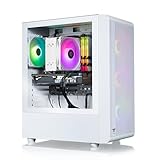
Perfect for mainstream gamers, the Skytech Archangel features a clean white aesthetic and standard DIY hardware components. Equipped with an AMD Ryzen 5 processor and RTX 4060 graphics, this system handles demanding esports games efficiently without prebuilt desktop thermal throttling issues due to its mesh front panel.
System storage is limited to a single 1TB NVMe drive, which fills up quickly with modern game installs. Upgrading storage requires adding extra drives later. Nevertheless, the standard motherboard and high-flow mesh chassis make this prebuilt desktop a trustworthy choice for gamers seeking long-term value.
Corsair Vengeance i7500 Gaming Desktop
Designed for enthusiasts, the Corsair Vengeance i7500 utilizes premium retail-grade components throughout its entire build. Featuring a liquid-cooled Intel Core i7 CPU and RTX 4070 graphics, it delivers high 1440p frame rates while functioning as a comprehensive prebuilt PC buying guide benchmark for build quality.
The primary downside is the higher price tag compared to budget alternatives on the market today. However, the inclusion of a Gold-rated power supply, Corsair Vengeance DDR5 memory, and a two-year full warranty completely eliminates the typical risks associated with pre-assembled gaming systems.
iBUYPOWER Element Pro Gaming PC
Targeted at competitive gamers, this rig pairs an AMD Ryzen 7 7800X3D processor with powerful RTX 4070 Super graphics. The massive L3 cache ensures ultra-smooth gameplay in CPU-heavy titles, making this desktop an excellent performer that easily avoids common prebuilt gaming rig bottleneck problems in modern gaming.
The prebuilt desktop thermal throttling potential is low, but fan noise increases noticeably under heavy synthetic stress tests. Rear port selection could also be more generous. Despite these minor quirks, the system delivers high 1440p and 4K performance along with clean interior wire management for easy care.
ASUS ROG Strix G16CH Gaming Desktop
Built for gamers who want bold style, the ASUS ROG Strix G16CH combines high-end Intel processing with NVIDIA RTX 4070 power. It handles high-refresh gaming effortless, offering custom aesthetic design and built-in headset handles that appeal directly to LAN tournament players and content creation streamers alike.
Some buyers may encounter proprietary motherboard limitations when attempting future motherboard swaps due to custom chassis mount points. However, the built-in liquid cooling and strong GPU performance ensure that out-of-the-box gaming remains fast, stable, and visually impressive across demanding gaming titles.
Frequently Asked Questions
Answers to common queries help gamers make informed buying choices while addressing common mistakes when buying a prebuilt gaming pc. Reviewing these expert responses clears up confusion surrounding custom components, power specifications, cooling demands, and long-term upgrade paths for your new desktop.
Is it better to build a custom PC or buy a prebuilt PC?
Weighing a custom vs prebuilt gaming PC comes down to your personal technical confidence and free time. Building custom offers total control over every component and often costs slightly less. However, prebuilt machines provide convenience, single-system warranties, and plug-and-play operation straight out of the box.
Prebuilt PCs eliminate assembly stress and initial troubleshooting hassle for busy gamers. High-quality prebuilts now feature standard retail parts, making them just as upgradeable as custom builds. Choose a prebuilt if you want full warranty protection and instant gaming without spending hours assembling parts yourself.
Why do prebuilt PCs get loud or overheat under heavy gaming loads?
Many prebuilt desktop thermal throttling issues stem from inadequate case airflow and cheap CPU coolers. Closed glass front panels without ventilation holes prevent cold air intake, causing internal heat buildup. High CPU temperatures force cooling fans to run at maximum speed, creating distracting system noise.
Selecting a case with a mesh front panel dramatically improves internal airflow and keeps temperatures low. Liquid cooling or dual-tower air coolers also maintain quiet operation during long gaming sessions. Ensuring proper fan configuration keeps hardware cool, extends component lifespan, and prevents performance drops.
How much RAM is necessary for modern gaming in a prebuilt PC?
Modern games require 16GB of dual-channel RAM as the minimum baseline for smooth gameplay. Single channel RAM performance severely limits system responsiveness, causing stuttering in open-world titles. Budget prebuilts with single 8GB memory sticks should be upgraded immediately to prevent performance bottlenecks.
For heavy multitasking, video streaming, and modern AAA titles, 32GB of DDR4 or DDR5 RAM offers ideal future-proofing. Choosing a system with 32GB ensures smooth performance across background applications. Verify that the prebuilt motherboard includes four memory slots so you can easily add extra RAM later on.
Can you upgrade all components in a prebuilt gaming PC?
Component upgradeability depends heavily on whether the manufacturer uses standard retail parts or OEM designs. Prebuilt PC upgradeability is straightforward when systems feature standard ATX motherboards and standard power supplies. You can easily upgrade storage, RAM, and graphics cards as performance demands increase.
Proprietary motherboard limitations on OEM desktops from certain mass manufacturers restrict easy power supply and case replacements. Checking specification sheets prior to purchase ensures standard component sizes. Choosing standard prebuilt desktops allows simple drop-in upgrades to keep your system fast for years.
Final Thoughts
By avoiding common mistakes when buying a prebuilt gaming pc, you can confidently invest in a high-performing desktop that delivers long-term satisfaction. Focus on balanced hardware, reliable power supplies, and upgradable designs. A well-chosen prebuilt system provides years of smooth, high-fps gaming without frustration.