How to choose a prebuilt gaming pc can feel overwhelming with endless spec sheets and flashy marketing claims. Finding the right preassembled rig requires balancing GPU power, CPU performance, and system airflow. This expert buying guide cuts through hardware jargon to help you pick a high-performing system that fits your budget easily.
How to Choose the Right Prebuilt Gaming PC
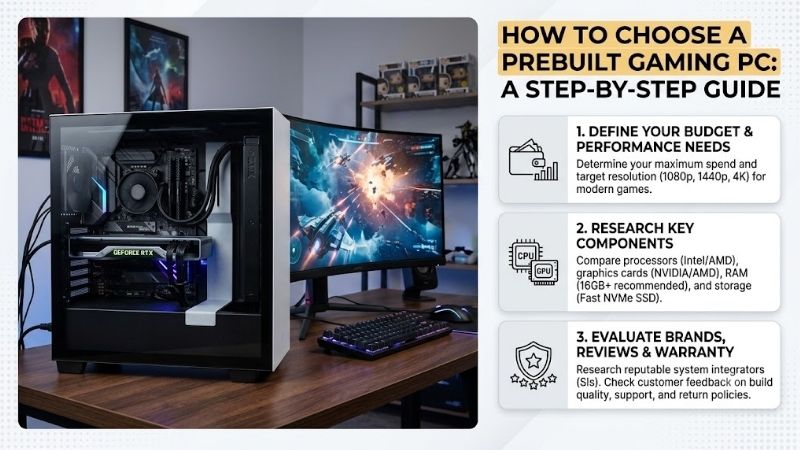
Understanding how to choose a prebuilt gaming pc starts with knowing which core components deliver maximum gaming performance for your hard-earned money. Paying attention to hardware balance ensures your machine handles modern titles smoothly without unnecessary thermal throttling.
Graphics Card (GPU) Selection
The graphics card dictates your frame rates and screen resolution capabilities in demanding modern titles. Prioritizing graphics card performance ensures smooth gameplay at 1080p, 1440p, or 4K resolutions without visual stutter. Look for current-generation cards with ample video memory to run future releases effortlessly.
Always match the GPU tier to your monitor’s refresh rate and native resolution for optimal efficiency. Skimping on the GPU to get a flashy processor is a common mistake that severely limits overall frame rates. A well-balanced preassembled rig prioritizes dedicated graphics over aesthetic RGB lighting every single time.
Processor (CPU) and Motherboard
Your processor handles game logic, physics calculations, and background system applications during long sessions. Avoiding a processor bottleneck guarantees your high-end graphics card runs at full potential during intense gaming action. Focus on middle-tier processors with high single-core performance for pure gaming efficiency.
Ensure the motherboard offers sufficient expansion slots and modern USB connectivity for future upgrades. Proprietary motherboard layouts can hinder later component swaps, so standardized ATX or Micro-ATX boards are always preferred. A solid foundation prevents early hardware obsolescence and saves money down the road.
RAM and NVMe SSD Storage
Modern games require substantial system memory and lightning-fast drive speeds to reduce load times. Choosing the proper RAM configuration like 16GB or 32GB of dual-channel memory prevents stuttering in open-world titles. Fast memory bandwidth directly improves overall system responsiveness under heavy gaming workloads.
Solid-state drives have become essential for modern PC setups, rendering mechanical hard drives virtually obsolete. Look for fast NVMe SSD storage with at least 1TB capacity to hold several large AAA games at once. Quick storage reduces level load screens and ensures seamless asset streaming during active gameplay.
Cooling, Power Supply, and Upgradability
Adequate thermal management determines how quiet and cool your system runs under heavy sustained loads. An effective airflow cooling system prevents thermal throttling, extending the lifespan of your expensive internal hardware. Mesh front panels and quality cooling fans maintain steady operating temperatures during long sessions.
Never overlook power efficiency when evaluating prebuilt configurations on current retail sites. Sufficient power supply wattage with standard 80 Plus ratings guarantees stable voltage delivery to critical components. Prioritizing component upgradability ensures you can swap parts easily when higher demands arise later.
| Gaming Tier | Target Resolution | Recommended GPU | Recommended CPU | System RAM |
| Budget | 1080p High | RTX 4060 / RX 7600 | Core i5 / Ryzen 5 | 16GB DDR4/DDR5 |
| Mid-Range | 1440p Ultra | RTX 4070 Super / RX 7800 XT | Core i7 / Ryzen 7 | 32GB DDR5 |
| High-End | 4K Ultra / VR | RTX 4080 Super / RTX 4090 | Ryzen 7 7800X3D / i9 | 32GB-64GB DDR5 |
Top Picks
Finding a preassembled system that offers true value requires carefully evaluating actual build quality and component selection. Our top selections highlight market-tested models that offer great performance out of the box. Knowing how to choose a prebuilt gaming pc makes comparing these desktop options straightforward.
CyberPowerPC Gamer Xtreme VR
This system is ideal for entry-level gamers seeking reliable 1080p graphics performance at an accessible price point. It features strong graphics card performance combined with a sleek chassis and customizable RGB illumination. Great thermal airflow and standard desktop components make this model an excellent entry into PC gaming.
The bundled power supply unit offers limited headroom for extreme future graphics upgrades. Included system cooling can get slightly loud under maximum processing load, though temperatures stay completely safe. Overall, it remains a fantastic budget gaming desktop option for budget-conscious buyers seeking instant plug-and-play setup.
Skytech Archangel Gaming PC
Designed for mid-range enthusiasts, this prebuilt desktop excels at smooth 1440p gameplay across modern AAA video games. It features fast dual-channel RAM configuration alongside an efficient processor that prevents system slowdowns. Clean cable management and non-proprietary internal hardware offer excellent long-term maintenance convenience.
The mid-tower case footprint occupies considerable desk space compared to compact small-form-factor builds. Base storage capacity may fill up quickly if you install multiple huge modern titles simultaneously. Nevertheless, its impressive price-to-performance ratio makes it a standout choice for high-refresh-rate gaming setups.
Lenovo Legion Tower 5i
This rig caters to gamers seeking quiet operation and subtle, professional aesthetics without sacrificing high frame rates. Its refined airflow cooling system keeps system noise low even during extended intensive gaming sessions. High-speed NVMe SSD storage ensures instant system boot times and fast game level loading across all programs.
The pre-installed system software requires a quick initial cleanup to remove unnecessary bloatware applications. Expansion ports inside the main chassis are slightly tight, requiring patience during future hardware maintenance. It remains a highly dependable option if you want reliable performance backed by solid manufacturer support.
iBUYPOWER SlateMesh Gaming Desktop
Targeted at competitive esports players, this desktop delivers exceptionally high frame rates for fast-paced multiplayer titles. The front mesh design supplies maximum ventilation to eliminate thermal throttling under continuous daily operation. Excellent component upgradability allows hassle-free GPU and memory swaps down the road without replacing the motherboard.
The included keyboard and mouse peripheral bundle feels basic and may warrant an early aftermarket upgrade. Rear panel port selection is standard, lacking some higher-speed USB-C connectivity found on premium motherboards. However, its outstanding thermal performance and core component balance make it a super smart investment.
HP OMEN 45L Gaming Desktop
This premium gaming desktop is tailored for hard-core gamers demanding maxed-out 4K visual fidelity and extreme processing power. Featuring a unique patented cooling chamber, it keeps high-tier components running at peak boost clocks effortlessly. Ample power supply wattage guarantees total stability when running demanding creative software or heavy VR titles.
The premium price tag requires a significant financial investment compared to standard mid-tier preassembled rigs. Its heavy steel chassis is bulky and challenging to move once set up on your workspace desk. For enthusiasts wanting top-tier performance without building from scratch, this system delivers incredible power.
Frequently Asked Questions
Is it cheaper to buy a prebuilt PC or build your own?
Building your own desktop can save money on component markups, but prebuilt systems offer full warranty coverage and convenience. Knowing how to choose a prebuilt gaming pc helps you find preassembled deals that match custom pricing closely. For many users, ready-to-use stability outweighs small DIY assembly savings.
What specs matter most when learning how to choose a prebuilt gaming pc?
The graphics card stands out as the most critical hardware element for generating high frame rates in games. Paired with adequate power supply wattage and sufficient system memory, it prevents processing bottlenecks. Balanced components ensure smooth performance across various desktop software and gaming titles without unexpected slowdowns.
How much RAM do I need in a gaming desktop?
A 16GB memory setup represents the standard minimum for fluid gaming across most current mainstream titles today. Upgrading to a 32GB dual-channel configuration provides extra headroom for heavy background multitasking and modern open-world games. Ensuring proper RAM bandwidth keeps frame times consistent and prevents micro-stuttering during gameplay.
Are prebuilt gaming PCs easy to upgrade in the future?
Most prebuilt systems utilizing standard motherboard dimensions allow effortless component upgrades as technology progresses. Choosing rigs with non-proprietary parts ensures you can replace storage drives, memory sticks, or graphics cards easily. Prioritizing component upgradability guarantees your desktop machine remains competitive for years ahead.
Final Thoughts
Learning how to choose a prebuilt gaming pc empowers you to select a reliable machine that matches your budget and gaming targets. By carefully evaluating graphics power, processor balance, and thermal design, you secure maximum performance without overspending. Investing in a well-cooled preassembled rig ensures years of immersive, high-frame-rate entertainment.