Capture card specs that actually matter empower game streamers to record clean video without lagging native displays. Ignoring key technical parameters causes screen tearing, distorted color profiles, and severe preview delay. Learning hardware requirements ensures effortless live stream production.
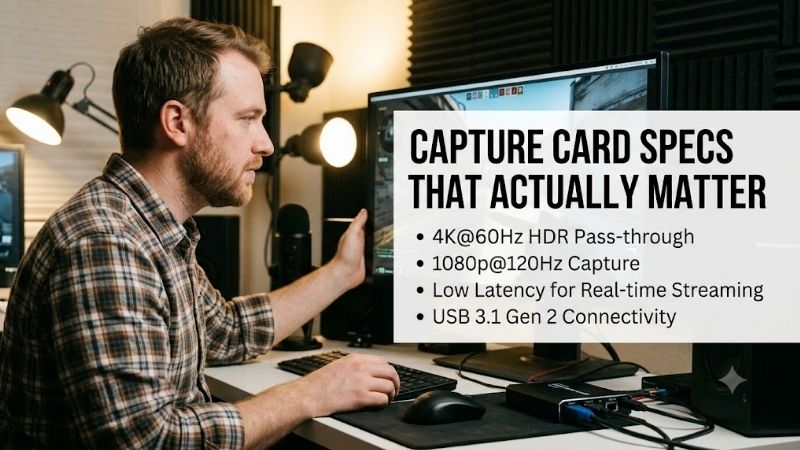
How to Choose the Right Capture Card Specs That Actually Matter
Evaluating capture card specs that actually matter requires analyzing interface bandwidth, display standards, and processing overhead. Investing in reliable capture devices protects primary system performance while routing smooth feeds to streaming tools. Clear technical specs keep broadcasts fluid.
Chroma Subsampling and Color Space Support
Evaluating color encoding parameters determines how accurately your hardware renders vibrant gameplay and crisp text edges. High quality video capture units process full YUV444 or RGB color pipelines to eliminate color compression artifacts. Accurate chroma subsampling preserves pristine broadcast fidelity.
Choosing hardware with limited color depth forces streams into compressed color modes that cause muddy gradient boundaries. Premium capture units maintain accurate color reproduction during high bitrate encoding across OBS Studio. Selecting full color depth ensures professional visual presentation.
Passthrough Resolution and Input Latency Limits
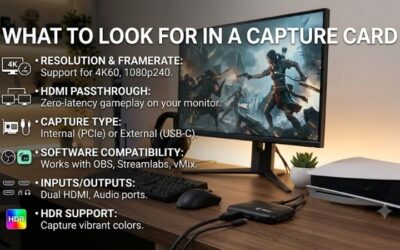
Analyzing loop-through performance ensures gaming monitors retain native resolutions without adding processing lag during gameplay. High performance capture cards send pristine uncompressed signals to screens while encoding feeds for broadcast software. Minimal input latency keeps competitive gaming responsive.
Selecting cards without dedicated pass-through forces creators to play inside laggy software preview windows continuously. Advanced hardware routes direct monitor video feeds to eliminate motion blur and input delay completely. Fluid display passthrough protects competitive gaming performance.
Variable Refresh Rate and High Dynamic Range
Checking sync compatibility prevents screen tearing during fast action games on high refresh rate monitors. Modern capture devices offer variable refresh rate support to match dynamic screen rates during demanding gameplay sessions. Smooth frame synchronization preserves fluid visual motion online.
Integrating dynamic range hardware converts high-contrast gaming feeds into standard SDR broadcasts cleanly. Quality internal tone mapping preserves subtle shadow details without washing out bright highlight areas on live streams. Proper refresh sync keeps broadcasts looking smooth and natural.
Video Formats and Software Encoding Overhead
Analyzing video formatting determines how efficiently uncompressed video feeds move from capture cards to streaming software. Modern hardware formats like NV12 format offer light GPU encoding overhead while preserving sharp visual detail. Streamlined video pipelines prevent sudden frame drops during live sessions.
Selecting outdated encoding formats strains host computer processors and leads to unexpected software crashes during streams. Efficient pixel formats offload video processing tasks from primary graphics cards effectively. Optimized hardware formatting maintains steady broadcast frame rates under load.
| Capture Spec | Key Metric | Ideal Target | Broadcaster Advantage |
| Passthrough | Refresh Rate | 4K @ 144Hz / 1080p240 | Unthrottled Gaming Display |
| Color Sampling | Chroma Format | RGB / YUV444 | Sharp Text & Accurate Color |
| Bus Interface | Bandwidth Speed | PCIe 3.0 / USB 3.2 Gen 2 | Low Latency Uncompressed Feed |
| Sync Support | Variable Refresh | VRR / G-Sync Passthrough | Tear-Free Competitive Play |
| HDR Processing | Tone Mapping | HDR10 to SDR Conversion | Vibrant Contrast Stream Quality |
Top Picks
Reviewing capture card specs that actually matter helps select field-tested devices for dual PC and console stream setups. We evaluated flagship capture cards based on latency, passthrough limits, and software stability. These proven devices deliver crisp broadcasts for growing channels.
Elgato 4K Pro PCIe Capture Card
Ideal for dual PC creators, this internal PCIe expansion card delivers pristine 4K60 capture with 8K passthrough. High-speed bus connectivity provides ultra-low latency preview feeds directly inside broadcast software without video drift. It provides rock-solid reliability for high-end setups.
Installing this expansion unit requires an open motherboard expansion slot, limiting portability across secondary laptops. Nevertheless, its high bandwidth overhead and flawless VRR passthrough deliver exceptional stream stability. A top-tier internal card for dedicated gaming desktop rigs.
AVerMedia Live Gamer ULTRA 2.1 GC553G2
Great for console streamers, this external HDMI 2.1 device handles smooth 4K144 passthrough while recording 4K footage. Its UVC driverless setup allows instant plug-and-play recognition across Windows and Mac computers. Integrated party chat audio ports simplify console broadcast routing.
The external housing can feel warm to the touch during prolonged high-resolution streaming sessions under heavy workloads. However, its HDMI 2.1 bandwidth and zero-lag passthrough offer outstanding flexibility for modern console gamers. A powerful external capture box for high-refresh setups.
Elgato 4K X External Capture Card
Perfect for laptop creators, this compact external capture box records 4K144 gameplay feeds using modern Type-C connections. High USB 3.2 throughput preserves rich HDR color depth while delivering low latency video previews. It operates seamlessly across multiple operating system platforms.
Achieving maximum capture frame rates requires connecting to dedicated 10Gbps USB ports on host motherboard panels. Despite high port bandwidth demands, its pocket-sized chassis and versatile UVC design deliver top portable performance. A stellar external capture box for mobile creators.
AVerMedia Live Gamer 4K 2.1 GC575
Designed for PC enthusiasts, this internal expansion card captures 4K60 video while supporting HDMI 2.1 bandwidth passthrough. Its direct PCIe motherboard connection guarantees lag-free video feed transmission into broadcasting software. Customizable RGB lighting blends cleanly with custom PC builds.
The companion software suite requires manual driver updates to unlock specialized audio routing options during initial setup. Nonetheless, its high bus bandwidth and comprehensive VRR passthrough make it an excellent choice for desktop builders. A high-performance internal capture solution.
EVGA XR1 Lite Capture Card
Built for budget creators, this compact capture box delivers crisp 1080p60 recording alongside smooth 4K pass-through features. Intelligent SDR tone mapping converts high dynamic range signals cleanly without washing out broadcast colors. Its lightweight chassis features clear status indicator lights.
The lightweight plastic casing feels somewhat less durable than heavier metal desk accessories on studio workstations. However, its low latency performance and simple OBS integration make it an unbeatable budget choice. A reliable entry-level capture card for recording console gameplay.
Frequently Asked Questions
Understanding capture card specs that actually matter answers key technical questions about video latency, passthrough limits, and software setup. Streamers must balance hardware encoding against host system capabilities. These clear answers explain how to evaluate capture hardware parameters correctly.
Why is passthrough resolution important for gaming?
Analyzing capture card specs that actually matter reveals how passthrough routes uncompressed video directly to gaming displays. Loop-through features prevent monitor frame rate drops while sending encoded feeds to streaming applications. Native passthrough preserves high refresh rate responsiveness.
Does a capture card offload encoding from my GPU?
Evaluating capture card specs that actually matter clarifies that capture devices process raw video data without built-in video encoding. A hardware encoding engine inside specialized units compresses video feeds before sending data to host computers. External encoding reduces processor workloads.
What is the difference between PCIe and USB capture cards?
PCIe expansion cards connect directly to motherboard slots to deliver massive data throughput with ultra-low preview latency. External USB cards transmit uncompressed video feed data over high-speed cables, offering portable setup convenience. Choosing interfaces depends on system port availability.
Why do I need VRR support on a capture card?
Variable refresh rate support synchronizes display refresh rates with GPU frame outputs to eliminate screen tearing during gameplay. Passing dynamic sync signals directly to gaming displays maintains fluid motion without adding processing lag. Dynamic sync protects competitive player accuracy.
Final Thoughts
Selecting capture card specs that actually matter ensures pristine live streams without sacrificing native gaming performance. From uncompressed video feed options to high-speed passthrough ports, properly evaluated specs deliver ultimate stability. Upgrading your capture hardware elevates broadcast quality.