
- Top Pick: Thkailar 1TB USB C Flash Drive for MacBook and Android Phones
- Best Value: SANDISK 1TB Ultra Flair USB 3.0 Flash Drive – Up to 150MB/s Read speeds, High-Speed USB 3.0 Performance, Password Protection – Sleek Metal casing, Black – SDCZ73-1T00-G46
- Premium Choice: MOVE SPEED 1TB Solid State Flash Drive 570MB/s High Speed USB Drive with Type C + USB 3.2 Drive Dual Port, Thumb Drive Compatible with iPhone 15, 16,17 Series/Android/Phone/MacBook/Audio/Smart TV
Anybody juggling large game libraries, 4K captures, or multi-terabyte creative projects eventually hits the wall where cloud sync feels sluggish and the internal drive on your laptop is already packed. A 1tb flash drive solves that problem by putting a full terabyte of storage in something that fits in your pocket, but the gap between the best options and the mediocre ones is enormous. Read speeds can vary from 100MB/s to 1000MB/s depending on the interface, and build quality ranges from aluminum shells that survive a backpack to plastic housings that crack on day three.
We compared every product on this list against published specifications, street prices, and the recurring themes that surface in owner reviews. The drives that consistently earn praise tend to combine a fast interface with durable construction and broad device compatibility. The ones that draw complaints usually cut corners on sustained write performance or ship with a connector design that fights your existing setup. Getting the balance right saves you hours of waiting and prevents the data-loss scenarios that cheap controllers can create.
As an Amazon Associate we earn from qualifying purchases at no extra cost to you. Product prices and availability are accurate as of the date shown and are subject to change.





Quick Picks
| Product | Best for | Price |
|---|---|---|
| Thkailar 1TB USB C | MacBook and Android users on a budget | $94.99 |
| SANDISK 1TB Ultra Flair | Reliable USB 3.0 with password protection | $154.99 |
| MOVE SPEED 1TB 570MB/s | Dual-port flexibility across phones and computers | $145.99 |
| UnionSine 1TB Portable HDD | Cheapest per-gigabyte option | $84.72 |
| SANDISK 1TB Ultra | Everyday file transfers at a trusted brand price | $149.99 |
| TEAMGROUP C175 1TB | Low-profile storage that stays out of the way | $119.99 |
| MOVE SPEED 1TB 1000MB/s | High-speed dual-port without premium-brand markup | $125.99 |
| SANDISK 1TB Extreme PRO Dual | Maximum sustained speed in a pocketable form | $226.99 |
How We Picked
Four criteria drove our ranking. First, interface speed: a drive that claims 100MB/s will feel sluggish next to one at 1000MB/s when you are copying a 60GB game patch, so the real-world throughput matters more than marketing labels. Second, connector flexibility: a 1tb flash drive with both USB-C and USB-A ports eliminates the need for adapters on modern laptops, phones, and older desktops alike. Third, build quality and thermal management, because sustained writes at high speeds can throttle any drive that cannot shed heat. Fourth, price-to-performance ratio, since some drives offer only marginal speed gains at double the cost of a capable alternative.
The 8 Best 1Tb Flash Drive in 2026
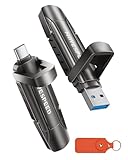
Thkailar 1TB USB C Flash Drive
This is the most affordable way to get a full terabyte onto a USB-C-only device like a MacBook Air or a modern Android phone. Owner feedback highlights the compact form factor and reliable recognition across both platforms, though some users report write speeds that trail the advertised read figure by a wide margin. If your primary workflow involves reading stored files rather than constantly writing large new ones, the speed gap matters less.
- Pro: USB-C native connection works with phones and laptops without an adapter
- Pro: Lowest price on this list among true solid-state flash options
- Con: Write speeds are noticeably slower than the marketing copy implies
Skip this if you regularly write large files or need a USB-A fallback port.
SANDISK 1TB Ultra Flair USB 3.0
Sandisk’s Ultra Flair remains a dependable mid-range pick for anyone who wants a no-nonsense USB-A drive with metal housing and built-in password protection. Owner reviews consistently praise the slim profile that sits flush against a laptop without protruding, and the 150MB/s read speed handles game archives and media files without excessive wait times. The password feature is a genuine security layer for professionals carrying client data on the go.
- Pro: Aluminum casing dissipates heat and resists daily wear
- Pro: Password protection adds software-level security at no extra cost
- Con: USB-A only, so you will need an adapter for USB-C ports
Pass on this if your devices have moved entirely to USB-C.
MOVE SPEED 1TB Solid State Flash Drive 570MB/s
The dual-port design on this drive means you can plug into a USB-C iPhone 15, 16, or 17 series phone or a standard USB 3.2 port on a desktop without juggling dongles. At 570MB/s read, it comfortably outpaces the USB 3.0 drives on this list while staying well under the price of top-tier options. Owners frequently note the metal finish feels premium relative to the cost.
- Pro: Dual USB-C and USB-A ports cover virtually every device you own
- Pro: 570MB/s read speed cuts large-file transfers to a fraction of slower drives
- Con: Brand name recognition is lower, which may concern buyers who prefer established support
Consider skipping if you want a drive backed by a widely known service network.
UnionSine 1TB Ultra Slim Portable External Hard Drive
This is technically an external HDD rather than a flash drive, which is important to flag because mechanical drives behave differently under impact and have slower access times. That said, it is the cheapest entry point to a full terabyte on this list at $84.72, making it viable for desktop backups or stationary media libraries where portability risk is low. Owner feedback confirms it reads and writes reliably over USB 3.0 but feels sluggish on random-access tasks.
- Pro: Lowest absolute price for 1TB of portable storage
- Pro: Ultra-slim chassis tucks easily into a laptop sleeve
- Con: Mechanical HDD internals are more fragile and slower than flash storage
Do not buy this if you need to toss the drive in a backpack or run applications from it.
SANDISK 1TB Ultra USB 3.0
The standard Ultra is the workhorse of Sandisk’s flash lineup, offering 130MB/s reads in a small plastic-and-metal body that has been shipping reliably for years. Owner reviews praise its consistency and wide compatibility, and the price undercuts the Ultra Flair while delivering only slightly less speed. It lacks the premium casing and password tools of its sibling, but for pure file transfer it gets the job done.
- Pro: Proven reliability across millions of units sold, with straightforward Sandisk support
- Pro: Compact size fits in tight laptop port spacing without blocking adjacent USB slots
- Con: 130MB/s is the slowest read speed among the Sandisk options here
Skip this if you need write-heavy performance or USB-C connectivity.
TEAMGROUP C175 1TB USB 3.2 Gen 1
TEAMGROUP’s C175 is designed to disappear: the matte black housing is so low-profile it barely extends past a laptop’s edge once plugged in. At 100MB/s read, it is not a speed champion, but it is one of the most affordable flash-only options at $119.99 and runs cool during extended transfers. Owners describe it as an ideal “leave it plugged in” drive for occasional large-file moves.
- Pro: Ultra-low-profile form factor never blocks neighboring ports
- Pro: USB 3.2 Gen 1 interface maintains backward compatibility with 3.0 and 2.0 ports
- Con: 100MB/s read speed is the slowest on this list for flash-based drives
Avoid this if transfer time is a bottleneck in your workflow.
MOVE SPEED 1TB Flash Drive 1000MB/s
This is the speed-to-value standout. At 1000MB/s read and write, it matches the top-tier Sandisk Extreme PRO while costing roughly half as much. The USB 3.2 Gen 2 plus USB-C dual-port layout covers phones, MacBooks, and desktops alike. Owner feedback on thermal behavior is mostly positive for short bursts, though some users note throttling during very long sustained writes, which is common at this price point.
- Pro: 1000MB/s sustained performance rivals drives costing twice as much
- Pro: Dual-port design eliminates adapter dependency for nearly all modern devices
- Con: May throttle under prolonged continuous writes exceeding several minutes
Look elsewhere if you need guaranteed sustained speed for multi-hundred-gigabyte backups without interruption.
SANDISK 1TB Extreme PRO Dual Drive
The Extreme PRO is the reference point for anyone who wants the fastest possible 1tb flash drive with USB-C and USB-A on a single body. Up to 1000MB/s read, a rugged metal shell, and Sandisk’s reputation for controller consistency make it the premium choice. The trade-off is obvious at $226.99, nearly twice the cost of the MOVE SPEED alternative that hits the same headline speed.
- Pro: Industry-leading brand support, warranty, and firmware updates
- Pro: Metal build withstands daily carry in a gaming bag or backpack without flex
- Con: Highest price on this list, nearly double comparable-speed alternatives
If budget is not a constraint and brand trust matters to you, this is the one to buy.
Buying Guide
Interface and Real-World Throughput
The marketing number on a drive’s listing almost always refers to sequential read speed, which is the easiest metric to optimize. Sequential write speed is what matters when you are moving files off your PC, and sustained performance over multi-minute transfers is where cheaper drives fall apart. USB 3.0 tops out around 5Gbps but real drives rarely exceed 200MB/s. USB 3.2 Gen 2 pushes toward 10Gbps and enables the 1000MB/s class you see on premium flash drives. Match the interface to the port on your machine, or you will cap the drive at the slower generation.
Port Configuration and Device Compatibility
A USB-C-only drive is a liability if you still use desktop PCs or older laptops with USB-A ports. A USB-A-only drive is a liability if your primary devices are MacBooks, iPhone 15 and later, or modern Android phones. Dual-port designs solve this neatly and cost only a few dollars more on most models. If you plan to run games or applications directly from the 1tb flash drive, also check whether the connector physically protrudes far enough to block adjacent ports on your specific laptop.
Thermal Management and Longevity
Flash memory degrades faster when it runs hot, and sustained writes generate the most heat. Metal housings act as passive heatsinks and tend to throttle later than plastic ones. If you anticipate writing more than 50GB in a single session, prioritize drives with aluminum or stainless-steel shells. For read-heavy workloads like playing stored games or streaming media, thermal throttling is rarely a concern regardless of casing material.
Our Verdict
For most buyers in 2026, the MOVE SPEED 1TB 1000MB/s is the clear top pick: it matches flagship speeds at roughly half the price and its dual-port design covers every device you are likely to encounter. The Thkailar 1TB USB C earns the budget slot at $94.99 for anyone who needs affordable USB-C flash storage and can tolerate moderate write speeds. The exception: if you want the peace of mind that comes with a manufacturer’s warranty, firmware support, and a ruggedized body you can trust for years of professional use, the SANDISK Extreme PRO Dual Drive justifies its premium.
FAQ
Is a 1tb flash drive the same as a 1tb external SSD?
They share the same underlying NAND flash technology, but external SSDs typically use faster controllers, offer SATA or NVMe interfaces via a cable, and are physically larger. A flash drive is more portable and plug-and-play, while an external SSD is better for sustained heavy workloads.
Can I install and play games directly from a 1TB USB flash drive?
Yes, and many owners do this to free up internal storage. Drives with 500MB/s or higher read speeds provide noticeably shorter load times, while drives at 100-150MB/s will work but feel sluggish compared to an internal SSD.
How long do 1TB flash drives last?
Under normal consumer use, a well-made drive should last five to seven years or longer. Heavy write cycles, constant heat, and cheap controllers are the main factors that shorten lifespan, which is why build quality and thermal management matter more than headline speed.
Is USB-C faster than USB-A?
The connector shape itself does not determine speed; the protocol does. USB-C ports can carry USB 3.2 Gen 2 at 10Gbps, while USB-A ports top out at 10Gbps only with Gen 2 controllers. In practice, drives with USB-C connectors are more likely to support faster protocols because the port standard is newer.
Ready to decide? Our #1 pick for 2026 is the Thkailar 1TB USB C.
Live price & availability on Amazon.


