Satechi has carved out a niche making docks that look as good as they perform, and its Thunderbolt lineup is a favorite among Mac users and design-conscious PC owners alike. With premium aluminum builds and dense port selections, these docks turn a single laptop into a clean, capable desktop workstation.
This review looks at what sets Satechi’s Thunderbolt docks apart, how the various models differ, and which one suits your setup. We’ll reference real units including the Thunderbolt 4 Slim Hub Pro, the cutting-edge Thunderbolt 5 CubeDock, and multi-display powerhouses so you can match a dock to your needs.
As an Amazon Associate we earn from qualifying purchases at no extra cost to you.


🎮 Get More From Your Setup — Free
Prime Gaming gives you free PC games every month, in-game loot, and a free Twitch channel sub — plus fast free shipping on all the gear above. New members get a 30-day free trial.
Watch: Satechi Thunderbolt Dock — Video Review
Design & Build
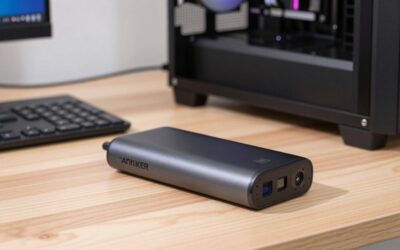
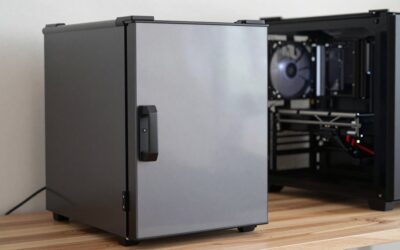
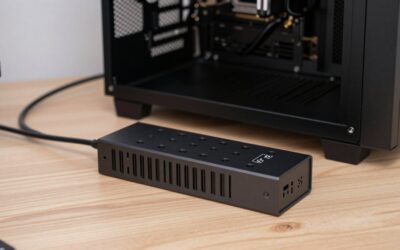
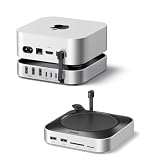
Satechi’s hallmark is premium industrial design, and its docks fit right in next to a MacBook or a minimalist PC setup. The Thunderbolt 4 Slim Hub Pro and Slim Hub keep a low, understated profile with brushed aluminum housings that dissipate heat and look sharp on a desk. The Thunderbolt 5 CubeDock takes a bold, compact cube shape and even includes a built-in NVMe SSD enclosure, a clever space-saver. Larger units like the 16-in-1 and 13-in-1 docks are chunkier to fit their extensive I/O but retain the same refined aesthetic. Build quality is excellent throughout, with sturdy metal enclosures and durable ports.
Performance
These docks pack serious capability behind their good looks. The Thunderbolt 4 Slim Hub Pro delivers 100W charging plus a strong port array, enough to power most laptops while driving displays and peripherals. The Slim Hub supports a single 8K or dual 4K display over USB 3.2 Gen 2, while the 16-in-1 dock pushes quad 4K/60Hz output for serious multi-monitor setups. The forward-looking Thunderbolt 5 CubeDock offers next-generation bandwidth and that integrated SSD bay for fast, tidy storage. Across models, data transfer is quick and stable, display output is clean, and charging is reliable. The 13-in-1 triple-4K dock with a headphone jack is a versatile all-rounder for mixed workflows.
Pros & Cons
- Premium aluminum design that complements Mac and PC setups.
- Strong multi-display support, up to quad 4K or single 8K depending on model.
- 100W charging on key models to power most laptops.
- Innovative features like the CubeDock’s built-in SSD enclosure.
- Premium pricing versus basic hubs.
- Some models need a power adapter, adding desk clutter.
- Port layouts vary, so check that yours match your peripherals.
Alternatives to Consider
If you want maximum ports and proven reliability, Plugable’s Thunderbolt 4 docks are strong rivals with dense I/O. Buyers who don’t need Thunderbolt bandwidth can save with a simpler USB-C hub for basic single-monitor use. And those wanting the latest standard should eye the Thunderbolt 5 CubeDock specifically for its future-ready bandwidth and integrated storage. For a blend of style and capability, though, Satechi remains a top choice.
Related Guides
- Best Blue Light Glasses For Gaming (2026)
- Macmini Hub (2026)
- m2 MacBook Air Dock (2026)
- m2 MacBook Air Dock (2026)
- Best Laptop For Light Gaming (2026)
Frequently Asked Questions
Which Satechi dock is best for multiple monitors?
The 16-in-1 Thunderbolt 4 dock supports quad 4K/60Hz, making it the top pick for multi-display setups. The 13-in-1 triple-4K dock is a strong alternative for three-monitor workflows.
Will it charge my MacBook?
Models like the Slim Hub Pro deliver 100W of charging, enough to power and charge most MacBooks and many PC laptops while connected. Very high-power gaming laptops may still need their own adapter.
What’s special about the Thunderbolt 5 CubeDock?
It offers next-generation Thunderbolt 5 bandwidth and a built-in NVMe SSD enclosure, letting you add fast storage inside the dock itself. It’s the most future-ready option in the lineup.
Are Satechi docks Mac-focused?
They’re designed to pair beautifully with MacBooks aesthetically and functionally, but they work with any Thunderbolt or USB4 laptop, including Windows machines. Compatibility is broad.
Verdict
Satechi Thunderbolt docks blend striking design with genuine capability, making them ideal for anyone who wants a clean, powerful desk setup. For everyday use, the Slim Hub Pro’s 100W charging and tidy profile shine; multi-monitor users should grab the 16-in-1 dock; and early adopters will love the Thunderbolt 5 CubeDock. They cost a bit more, but the looks and performance justify it.