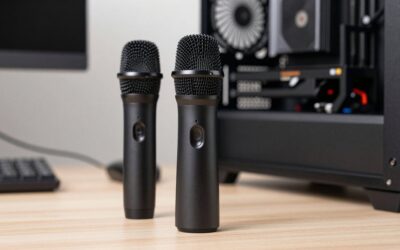
Once your gameplay is dialed in, the next upgrade that teammates and viewers actually notice is your voice. A standalone microphone sitting on your desk or boom arm captures cleaner, richer, more professional audio than any headset mic, rejecting keyboard clatter and room noise so your callouts and commentary come through with clarity.
- Top Picks at a Glance
- Watch: Best Standalone Mic For Gaming — Video Review
- How to Choose a Standalone Gaming Mic
- The Best Standalone Gaming Mics Reviewed
- More Standalone Mics Worth Considering
- What to Look For in a Standalone Gaming Mic
- Best Standalone Mic for Gaming With Loud Background Noise
- Which Mic Should You Buy?
- Common Mistakes When Buying a Gaming Mic
- Setting Up a Standalone Mic Step by Step
- Troubleshooting Common Audio Problems
- Do You Need XLR?
- More Gaming Mic Questions
- Frequently Asked Questions
- Final Thoughts
- Related Articles
We compared USB and XLR standalone mics built for gaming and streaming using manufacturer specifications, published documentation and recurring buyer feedback, weighing noise rejection, ease of setup, and useful extras like tap-to-mute and onboard gain. This ranking is research-based, not a bench-test result. Here are our top picks, a practical buying guide, and answers to the questions most players have when moving beyond a headset mic.
Editor's Pick
Updated October 2026 – picks rechecked against current maker listings.
Quick answer: for the best standalone mic for gaming and loud background noise, pick a cardioid dynamic model, because it hears mostly what is a few inches in front of the capsule. Our top three are the FIFINE AmpliGame AM8 (best value USB/XLR), the Shure MV6 (best plug-and-play for noisy rooms) and the TONOR TC310+ set (best all-in-one kit for a quiet room). Any of these will beat a headset boom mic for a PC on a stand.
Top Picks at a Glance
| Mic | Capsule | Connection | Best for |
|---|---|---|---|
| FIFINE AmpliGame AM8 | Dynamic | USB and XLR | Noisy rooms on a budget |
| FIFINE AmpliGame AM8T Set | Dynamic | USB and XLR | Desk bundle with boom arm |
| MAONO PD200X | Dynamic | USB and XLR | Software EQ and a headphone jack |
| Shure MV6 (Gen 2) | Dynamic | USB-C | Plug-and-play in loud rooms |
| Elgato Wave DX | Dynamic | XLR only | Pairing with an audio interface |
| TONOR TC310+ Set | Condenser | USB | Complete kit for new streamers |
| HyperX SoloCast 2 | Condenser | USB-C to USB-A | Small desks |
| HyperX QuadCast 2 | Condenser | USB-C | Console and PC with on-board controls |
FIFINE Gaming PC USB Microphone, Podcast Condenser Mic with Boom Arm, Pop Filter, Mute Button for Streaming, Twitch, Online Chat, RGB Computer Mic for PS4/5 PC Gamer Youtuber-AmpliGame A6T


FIFINE AmpliGame AM8 USB/XLR Dynamic Microphone for Gaming Streaming | Podcast Mic with RGB Light, Mute Button, Headphones Jack, Desktop Stand, for Vocal Recording Singing YouTube
Included for '16 Best Standalone Mics For Gaming' as a representative home product in this roundup; selection reflects the product set returned for this topic.
View on Amazon
FIFINE AmpliGame AM8T XLR/USB Gaming Microphone Set, Dynamic PC Mic | Streaming RGB Mic Kit with Boom Arm Stand, Mute Button, Headphones Jack, for Podcasting Recording Vocal Voice-Over
Included for '16 Best Standalone Mics For Gaming' as a representative home product in this roundup; selection reflects the product set returned for this topic.
View on Amazon
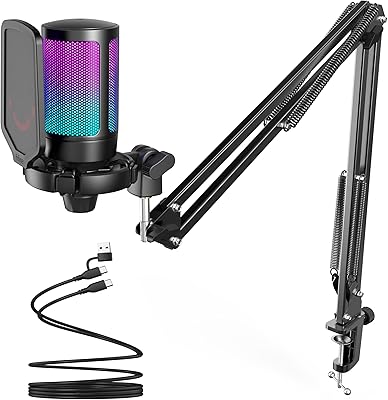
TONOR Gaming Microphone Set with Boom Arm, Vocal Condenser Microphone for Content Creators, USB Mic for PC with Stand, RGB, Tap Mute, Gain Control, Gaming Equipemnt, Twitch, Streaming, TC310+
Included for '16 Best Standalone Mics For Gaming' as a representative home product in this roundup; selection reflects the product set returned for this topic.
View on Amazon
FIFINE AmpliTank K688CT Podcast Microphone Kit, USB/XLR Dynamic Mic | Streaming Mic with Boom Arm for PC/Mixer, with Mute Button, Headphone Jack for Instrument Recording Vocal Gaming Voice-Over
Included for '16 Best Standalone Mics For Gaming' as a representative home product in this roundup; selection reflects the product set returned for this topic.
View on Amazon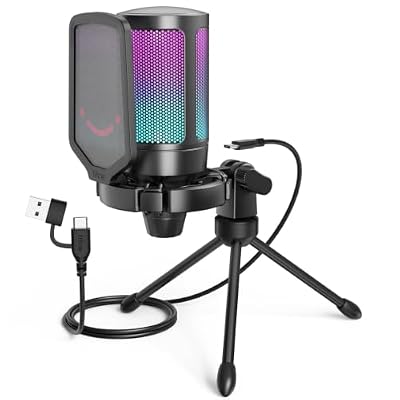
FIFINE AmpliGame A6V USB Gaming Microphone, Condenser RGB Mic for Streaming | Quick Mute, RGB, Gain Control, Tripod Stand, Pop Filter, Shock Mount, for PC/PS5 Discord Twitch Podcasts Videos YouTube
Included for '16 Best Standalone Mics For Gaming' as a representative home product in this roundup; selection reflects the product set returned for this topic.
View on Amazon
Gaming Microphone for PC: USB Mic for Podcasts Videos & Streaming - Condenser Mic with Quick Mute & Pop Filter - RGB Microphone Gift for Gamer boys - Compatible with PS4/5 & Computer & Laptop
Included for '16 Best Standalone Mics For Gaming' as a representative home product in this roundup; selection reflects the product set returned for this topic.
View on Amazon
USB Microphone for PC Gaming: Condenser Microphone RGB for Gamer with Stand Mic - Recording Mic for Computer&Laptop with Qiuck Mute - Desk Podcast Mic for Podcast & Singing & Streaming & Youtube Black
Included for '16 Best Standalone Mics For Gaming' as a representative home product in this roundup; selection reflects the product set returned for this topic.
View on Amazon🎮 Get More From Your Setup — Free
Prime Gaming gives you free PC games every month, in-game loot, and a free Twitch channel sub — plus fast free shipping on all the gear above. New members get a 30-day free trial.
Watch: Best Standalone Mic For Gaming — Video Review
How to Choose a Standalone Gaming Mic
- USB vs. XLR: USB mics plug in and work instantly; XLR offers room to grow into an interface or mixer for higher-end audio down the line.
- Dynamic vs. condenser: Dynamic mics reject background noise and suit untreated rooms; condensers capture more detail but pick up more of your surroundings.
- Onboard controls: Tap-to-mute, gain knobs, and a headphone jack for zero-latency monitoring make daily use far smoother.
- Mounting: Decide between a desktop stand and a boom arm; an arm frees desk space and lets you position the mic closer to your mouth.
- Extras: RGB lighting, pop filters, and shock mounts add polish, but prioritize clean sound and a solid pickup pattern first.
The Best Standalone Gaming Mics Reviewed
FIFINE AmpliGame AM8
The AM8 is a dynamic USB/XLR mic that rejects background noise well and includes RGB lighting, a mute button, and a headphone jack. It’s an outstanding value entry point for gamers who want broadcast-style clarity.
FIFINE AmpliGame AM8T Set
The AM8T bundles the same dynamic capsule in an XLR/USB set, giving you a ready path toward a more advanced audio chain. It’s ideal if you plan to add a mixer or interface later.
TONOR TC310+ Condenser Set
This TONOR kit pairs a condenser mic with a boom arm, RGB, tap-to-mute, and gain control. It’s a complete, budget-friendly package for content creators who want everything in one box.
FIFINE AmpliTank K688CT
The K688CT is a dynamic USB/XLR vocal mic tuned for podcasting and streaming, with a full-bodied sound and flexible connectivity. It’s a step up for creators who want a richer, warmer tone.
HyperX SoloCast 2
The compact SoloCast 2 is a plug-and-play USB condenser with a built-in pop filter, internal shock mount, and 24-bit/96kHz audio. Its tiltable stand and small footprint make it perfect for tighter desks.
More Standalone Mics Worth Considering
These additions cover the tiers and connection types the first group leaves open: a premium USB option for noisy rooms, a second budget hybrid, an XLR-only pick for interface owners and a console-friendly condenser.
Shure MV6 (Gen 2) – Best Plug-and-Play Mic for Loud Rooms

Shure MV6 USB Microphone for Gaming, Streaming & Recording (Gen 2, Black) | Entry-level professional-quality USB-C microphone for audio capture, included stand and cable, MOTIV Apps Support
Included for '16 Best Standalone Mics For Gaming' as a representative home product in this roundup; selection reflects the product set returned for this topic.
View on AmazonThe Shure MV6 is an entry-level take on the brand’s broadcast mics, aimed at gamers who want a clean voice without learning an audio chain. Its dynamic design suits untreated bedrooms, and the maker’s MOTIV app lets you adjust the sound on a PC.
Specs: Dynamic capsule · USB-C connection · Stand and cable included · MOTIV app support · Made for gaming, streaming and recording
- Pros: Simple setup; suited to rooms with fans or keyboard noise; included stand and cable; app control for tone.
- Cons: Costs about double the FIFINE picks or more; USB only, so there is no XLR upgrade path.
Skip it if you want an XLR route to an interface later, or you are working to a tight budget.
MAONO PD200X – Best Budget Hybrid With Software

MAONO PD200X XLR/USB Dynamic Microphone, RGB Gaming Mic with Software | PC Mic with Mute, Gain Knob, Volume Control and Headphone Jack for Gaming, Streaming, Podcasting, Recording
Included for '16 Best Standalone Mics For Gaming' as a representative home product in this roundup; selection reflects the product set returned for this topic.
View on AmazonThe PD200X is a direct rival to the FIFINE AM8: a dynamic USB/XLR mic with mute, gain and volume controls plus a headphone jack for zero-latency monitoring. The maker supplies software for EQ-style tweaks.
Specs: Dynamic capsule · USB and XLR outputs · Gain knob and volume control · Mute button · Headphone jack · RGB lighting · Software support
- Pros: Hybrid connection; on-body controls; headphone monitoring; software tuning.
- Cons: No boom arm in the base listing; you need to buy an XLR cable and an interface separately to use XLR.
Skip it if you want a ready-made arm bundle; the FIFINE AmpliGame AM8T Set covers that.
Elgato Wave DX – Best XLR Dynamic for an Interface

Elgato Wave DX Dynamic XLR Microphone, Cardioid Pattern | Speech-optimized capsule, Room noise rejection, No signal booster needed, Swivel mount included, Broadcast-ready
Included for '16 Best Standalone Mics For Gaming' as a representative home product in this roundup; selection reflects the product set returned for this topic.
View on AmazonThe Wave DX is a speech-tuned dynamic XLR mic for players who already own, or plan to buy, an audio interface or mixer. It is built to reject room noise, and the listing notes that no signal booster is needed.
Specs: Dynamic capsule · Cardioid pattern · XLR output only · Speech-optimized capsule · Swivel mount included
- Pros: Strong room-noise rejection; broadcast-style tone; swivel mount included; no booster needed.
- Cons: No USB, so it needs an interface and an XLR cable bought separately; no on-body mute.
Skip it if you want to plug straight into a PC; choose a USB/XLR hybrid instead.
HyperX QuadCast 2 – Best Condenser for PC and Console
The QuadCast 2 is a USB-C condenser with on-board controls and LED lighting, listed for PC, Mac, PS5 and PS4. It suits players who share a setup between a PC and a console and have a fairly quiet room.
Specs: Condenser capsule · USB-C connection · On-board controls · LED lighting · Removable shock mount · PC, Mac, PS5 and PS4 listed
- Pros: Console support listed; shock mount; on-board controls; good looks on camera.
- Cons: A condenser picks up more room and keyboard sound than a dynamic; needs a quiet room or a close position.
Skip it if your room is loud; a dynamic mic such as the FIFINE AmpliGame AM8 handles it better.
What to Look For in a Standalone Gaming Mic
Dynamic Versus Condenser Capsules
A dynamic microphone such as the FIFINE AmpliGame AM8 and the AmpliTank K688 tends to reject distant sound, which helps in untreated rooms with fans and loud keyboards. A condenser, such as the TONOR TC310+ set, is more sensitive and captures more detail, but also picks up more room noise. In a noisy gaming space, a dynamic model usually gives cleaner results.
USB, XLR or Both
The AM8 and K688 offer both USB and XLR outputs. USB plugs straight into a PC, while XLR connects to an audio interface and supports future upgrades. Manufacturer information says the mute, gain and headphone controls on these models work only in USB mode, and no XLR cable is included in the box.
Pickup Pattern and Distance
Both models use a cardioid pattern, which hears the front and rejects the rear. Speaking a few inches from the capsule, slightly off-axis to reduce plosives, helps with consistent volume. A pop filter or foam windscreen further reduces harsh breath sounds.
Wireless Options for Mobile Use
The DJI Mic 2 lists a maximum transmission range of 250 meters in open, interference-free conditions, while the Mic 3 lists 400 meters under similar conditions. Both support 32-bit float recording, which protects against clipping when levels spike. They suit content creators who move around, not a fixed desk setup.
Best Standalone Mic for Gaming With Loud Background Noise
For a loud room, choose a dynamic cardioid mic and sit close. The FIFINE AmpliGame AM8, MAONO PD200X, Shure MV6 and Elgato Wave DX all use dynamic capsules, so they favor your voice over fans, keyboards and distant talk. Condensers such as the HyperX QuadCast 2 and TONOR TC310+ capture more detail but need a calmer room.
Best Standalone Mic by Situation
| Situation | Pick | Why |
|---|---|---|
| Loud background noise | FIFINE AmpliGame AM8 · Shure MV6 | Dynamic capsules favor close speech |
| Standalone mic with a stand or arm in one box | FIFINE AmpliGame AM8T Set · TONOR TC310+ Set | Arm or stand supplied with the set |
| PS5 or console chat | HyperX QuadCast 2 · FIFINE AmpliGame A6T | Console support is named in the listings |
| Budget PC with a headset already | FIFINE AmpliGame A6V · HyperX SoloCast 2 | Low cost, USB, nothing else to buy |
| Future interface or mixer | Elgato Wave DX · FIFINE AmpliTank K688CT | XLR output for later upgrades |
Best PS5 Standalone Mic
For a PS5, pick a USB mic whose maker lists console support, such as the HyperX QuadCast 2 or the FIFINE AmpliGame A6T. XLR-only models like the Elgato Wave DX need an audio interface and are not a simple console plug-in, so check the console note on any listing before buying.
Best Standalone Mic Setup for a Budget PC Using a Headset
If you already own a headset and a budget PC, add a USB mic on a stand and keep the headset only for listening. A FIFINE AmpliGame A6V or HyperX SoloCast 2 fits that role at the low end, and the AM8 is the step up if your room is noisy. Set the mic as the input device in Windows and in your voice app so the headset mic is not used.
Best Gaming Mic With a Stand
For a gaming mic with a stand included, the Shure MV6 and HyperX SoloCast 2 list a stand, and the TONOR TC310+ set adds a boom arm. If you want the mic off the desk, the FIFINE AmpliGame AM8T Set bundles a boom arm, which also cuts keyboard vibration.
Standalone Microphone vs. Headset Mic
A standalone microphone gives a fuller voice and lets you place the capsule where you want. A headset boom mic stays at a fixed distance and moves with your head, which keeps volume steady but sounds thinner. Players who stream or record usually move to a standalone mic and keep the headset for listening only.
Which Mic Should You Buy?
| If you… | Choose… |
|---|---|
| Play in a noisy room and want USB simplicity | FIFINE AmpliGame AM8 |
| Want a bundle with extras for desk use | FIFINE AmpliGame AM8T Set |
| Prefer a condenser kit with accessories | TONOR TC310+ Condenser Set |
| Want a dynamic mic with USB and XLR plus an arm | FIFINE AmpliTank K688CT |
| Need a wireless mic for travel and filming | DJI Mic 2 or DJI Mic 3 |
Common Mistakes When Buying a Gaming Mic
- Mistaking a replacement boom for a standalone mic. A headset replacement part works only with compatible headsets.
- Setting gain too high. Excess gain amplifies keyboard noise and room tone.
- Talking too far away. Distance reduces volume and exaggerates room sound.
- Assuming condensers work well in untreated rooms. Their sensitivity can work against you.
- Forgetting an arm or shock mount. Desk vibrations travel through a stand.
Setting Up a Standalone Mic Step by Step
- Mount the microphone on a boom arm or stand, away from the keyboard so vibrations do not transfer.
- Position it a few inches from your mouth, aimed slightly off-axis to reduce plosive sounds.
- Connect through USB, or through an interface if you are using XLR with a compatible cable.
- In your operating system and voice app, select the microphone as the input device.
- Set the gain so normal speech peaks in the upper half of the meter without hitting the ceiling.
- Record a short sample, listen with headphones and adjust distance before changing any settings.
Troubleshooting Common Audio Problems
| Problem | Likely cause | Fix |
|---|---|---|
| Loud keyboard clatter in chat | Gain too high or the mic sits too far away | Lower gain and move the capsule closer |
| Harsh p and b sounds | Speaking directly into the capsule | Angle the mic and add a pop filter |
| Quiet voice | Mic too far or gain too low | Reduce distance, then raise gain slightly |
| Gain knob has no effect | Mic is connected over XLR | Gain and mute controls on the K688 and AM8 work in USB mode only |
| Wireless dropouts | Obstacles or interference | Stay within line of sight and reduce nearby wireless traffic |
Do You Need XLR?
For most gamers, USB is enough. XLR becomes worthwhile when you want to add an audio interface, upgrade preamps or share the same microphone across different setups. Choosing a model that offers both outputs keeps that option open without forcing you to buy twice.
Why Room Treatment Matters Less Than Distance
Soft furnishings, a rug and curtains reduce echo, yet the biggest improvement usually comes from sitting closer to the capsule. A dynamic microphone used at a short distance captures mostly direct voice, which is why many streamers rely on it even in plain bedrooms.
More Gaming Mic Questions
What is the best standalone mic for gaming in a noisy room?
A cardioid dynamic mic is best in a noisy room. The FIFINE AmpliGame AM8 and Shure MV6 are our top picks, because dynamic capsules favor close speech and reject distant sound. Sit a few inches from the capsule and keep gain moderate for the cleanest result.
Is a standalone microphone better than a headset mic?
Yes for sound quality, as a standalone mic captures a fuller voice and lets you choose the position. A headset mic is simpler and keeps a steady distance. If your room is loud, a dynamic standalone mic close to your mouth usually beats a headset boom.
Can I use a standalone mic on PS5?
Many USB mics work on a PS5, but compatibility varies by model, so look for console support in the maker’s listing, as with the HyperX QuadCast 2. XLR-only mics such as the Elgato Wave DX need an audio interface and are not plug-and-play on a console.
Do I need a pop filter or boom arm?
A pop filter is cheap and helps with harsh p and b sounds. A boom arm moves the mic off the desk, which cuts vibration and puts the capsule closer to your mouth. The FIFINE AmpliGame AM8T Set and TONOR TC310+ set include an arm.
Frequently Asked Questions
Do I need XLR or is USB enough?
USB is more than enough for the vast majority of gamers and streamers, offering great sound with zero setup. Only choose XLR if you plan to expand into an interface, mixer, or multi-mic setup.
Is a dynamic or condenser mic better for gaming?
Dynamic mics are usually the safer bet because they reject fan noise, keyboard clatter, and room echo. Condensers sound more detailed but need a quieter, treated space to shine.
Should I use a boom arm?
A boom arm frees up desk space, reduces vibration noise, and lets you position the mic ideally close to your mouth. Several of our picks include one in the box.
Why does my mic pick up my keyboard?
High gain, a condenser capsule, or poor positioning all contribute. A dynamic mic on a boom arm with sensible gain settings dramatically cuts keyboard bleed.
Final Thoughts
The FIFINE AmpliGame AM8 is our top overall pick for delivering clean, noise-rejecting audio at a friendly price, while the TONOR TC310+ set is the best grab-and-go bundle for new streamers. For smaller desks, the HyperX SoloCast 2 offers excellent plug-and-play sound in a tiny footprint.